

Search found 1436 matches
- Mon Jan 18, 2010 5:46 am
- Forum: The Atlas
- Topic: Japan - 日本 - Quenched
- Replies: 867
- Views: 500891
Re: Japan - 日本 (D, Gp) V12.8 (Upd 1-18)pg45 Sushi anyone?
looking good, i only think the army circle on the ship and the chubu region could pop up more
- Wed Jan 13, 2010 7:25 am
- Forum: Melting Pot: Map Ideas
- Topic: [Looking for Map Maker] Silk Road
- Replies: 19
- Views: 10384
Re: Silk Road
i can help you out send me a pm. and well see if it works out
- Wed Jan 13, 2010 7:23 am
- Forum: Melting Pot: Map Ideas
- Topic: Golfe du St. Laurent[FD,G,GP,FF]
- Replies: 856
- Views: 187344
Re: Golfe du St. Laurent[FD,G,GP,FF]
is it alright if i say i agree to it?
- Wed Jan 13, 2010 7:18 am
- Forum: Melting Pot: Map Ideas
- Topic: Redoing graphics on: the netherlands
- Replies: 14
- Views: 2317
Re: Redoing graphics on: the netherlands
if so many people like the old one better (i am really clueless as to why that is) than i aint gonna continue with this so guess this thread can go in the bin
- Sun Jan 10, 2010 9:48 am
- Forum: Melting Pot: Map Ideas
- Topic: Redoing graphics on: the netherlands
- Replies: 14
- Views: 2317
Re: Redoing graphics on: the netherlands
just posting an update
font isnt perfect will try to search for a better one forget 1 bridge too
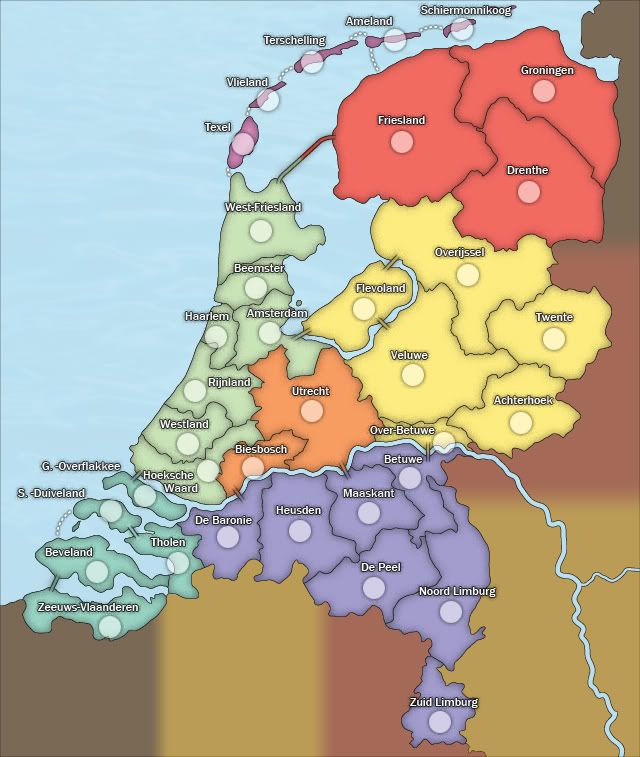
font isnt perfect will try to search for a better one forget 1 bridge too
- Sun Jan 10, 2010 5:24 am
- Forum: Tools & Guides
- Topic: Simple method for making perfect army circles
- Replies: 20
- Views: 16980
Re: Simple method for making perfect army circles
photoshop cs4?
- Sat Jan 09, 2010 5:52 pm
- Forum: Tools & Guides
- Topic: Simple method for making perfect army circles
- Replies: 20
- Views: 16980
Re: Simple method for making perfect army circles
i took a look at them and tried them with my method, you have to take 1 or 2 extra steps but than you get a perfect pixel ratio for your goal. if you want to know how i can show you only not now too late 
- Sat Jan 09, 2010 4:07 pm
- Forum: The Atlas
- Topic: The Dawn Of Ages - Quenched
- Replies: 481
- Views: 360322
Re: The Dawn Of Ages[D,Gp] - VOTE ON MOUNTAINS - Choose on Pg 18
4, but your missing a layer i guess 
- Sat Jan 09, 2010 4:03 pm
- Forum: Tools & Guides
- Topic: Simple method for making perfect army circles
- Replies: 20
- Views: 16980
Re: Simple method for making perfect army circles
it works but not perfect and if you can make a perfect circle in a different way why not? just trying to make your skills with the programs even better.
- Sat Jan 09, 2010 2:10 pm
- Forum: Tools & Guides
- Topic: Simple method for making perfect army circles
- Replies: 20
- Views: 16980
Re: Simple method for making perfect army circles
resizing and stretching tend to not evenly distort pixels so you can end up with an uneven looking circel/oval
- Sat Jan 09, 2010 1:54 pm
- Forum: The Atlas
- Topic: Monsters! - Battle for the Powerstones
- Replies: 473
- Views: 570538
Re: Monsters! [D,GP]
Can anyone point me to a good tutorial on how to soften/feather stroke that has been applied to a layer?
=D=
if you mean you made the stroke by layerstyle, than you can unattach the stroke by clicking on the layerstyle flap and select create image this way the stroke will become an editable ...
=D=
if you mean you made the stroke by layerstyle, than you can unattach the stroke by clicking on the layerstyle flap and select create image this way the stroke will become an editable ...
- Sat Jan 09, 2010 1:46 pm
- Forum: Tournament Archives
- Topic: Idea: play against the maker
- Replies: 11
- Views: 1904
Re: Idea: play against the maker
but what about the ones who wrote their own XML :p 
but if your serious i would pm all the mpmakers and hope they respond
but if your serious i would pm all the mpmakers and hope they respond
- Sat Jan 09, 2010 9:01 am
- Forum: Tools & Guides
- Topic: Simple method for making perfect army circles
- Replies: 20
- Views: 16980
Re: Simple method for making perfect army circles
I start a new canvas at 22 pixels by 22 pixels, then draw a white circle and make sure it touches the edges of the canvas. Done! I then transfer it to what ever map I'm playing around with and reduce the opacity to where you can just see it. It's that easy! If you want a 20x20 circle, just make ...
- Sat Jan 09, 2010 9:00 am
- Forum: Tournament Archives
- Topic: Idea: play against the maker
- Replies: 11
- Views: 1904
Re: Idea: play against the maker
i dunno just dont like pure 1vs1 but doubles are ok
- Sat Jan 09, 2010 7:05 am
- Forum: Melting Pot: Map Ideas
- Topic: DNA
- Replies: 11
- Views: 2726
Re: DNA
nice ideea i suggest you go with the look of the second picture think that would be cool
- Sat Jan 09, 2010 5:10 am
- Forum: Melting Pot: Map Ideas
- Topic: Viking map
- Replies: 15
- Views: 1975
Re: Viking map
the start beleive it was like 8 or 9th century
thnx for the link will be a nice indicator, btw where did you find your resources?
thnx for the link will be a nice indicator, btw where did you find your resources?
- Fri Jan 08, 2010 6:18 pm
- Forum: Melting Pot: Map Ideas
- Topic: Golfe du St. Laurent[FD,G,GP,FF]
- Replies: 856
- Views: 187344
Re: Golfe du St. Laurent[FD,G,GP,FF]
i am cool with that
and now i took a second look, the borders round cape breton look weird IMO
and now i took a second look, the borders round cape breton look weird IMO
- Fri Jan 08, 2010 9:33 am
- Forum: Melting Pot: Map Ideas
- Topic: Golfe du St. Laurent[FD,G,GP,FF]
- Replies: 856
- Views: 187344
Re: Golfe du St. Laurent[FD,G,GP,FF]
uhh these are the small things that i see that need fixing
in the circles there are some dark blobs that really need to be fixed
and the area well i wrote what i thought about that
Dolomite let me know if you want to do it or if you want me to do it
(btw hope i had the latest version but took ...
in the circles there are some dark blobs that really need to be fixed
and the area well i wrote what i thought about that
Dolomite let me know if you want to do it or if you want me to do it
(btw hope i had the latest version but took ...
- Fri Jan 08, 2010 9:30 am
- Forum: Tournament Archives
- Topic: Idea: play against the maker
- Replies: 11
- Views: 1904
Re: Idea: play against the maker
i like it and will play but maybe you should let mapmakers let them have their favorite setting to play (also players cause i dont like 1vs1 )
)- Fri Jan 08, 2010 9:21 am
- Forum: Melting Pot: Map Ideas
- Topic: Golfe du St. Laurent[FD,G,GP,FF]
- Replies: 856
- Views: 187344
Re: Golfe du St. Laurent[FD,G,GP,FF]
i guess you can do it with ease it are just some broken pixels which need softening or what ill like circle them or something to show you which i mean
- Wed Jan 06, 2010 1:23 pm
- Forum: Melting Pot: Map Ideas
- Topic: Redoing graphics on: the netherlands
- Replies: 14
- Views: 2317
Re: Redoing graphics on: the netherlands
that wouldnt be a problem since i am the original mapmaker
- Wed Jan 06, 2010 11:35 am
- Forum: Melting Pot: Map Ideas
- Topic: 6PK World Cities 1
- Replies: 57
- Views: 8281
Re: 6PK World Cities 1
well i think you can make way better frames but if you dont find it necesary i cant force you
- Wed Jan 06, 2010 10:54 am
- Forum: Melting Pot: Map Ideas
- Topic: Golfe du St. Laurent[FD,G,GP,FF]
- Replies: 856
- Views: 187344
Re: Golfe du St. Laurent[FD,G,GP,FF]
how you mean? cant i have critique on some of the parts that dont look nice.
btw before i left i handed the graphics over to another person as far as i know dont know where he is so dont go blame me. (except for losing the file ofcourse)
and the whole problem was not having my consent while i made ...
btw before i left i handed the graphics over to another person as far as i know dont know where he is so dont go blame me. (except for losing the file ofcourse)
and the whole problem was not having my consent while i made ...
- Wed Jan 06, 2010 10:51 am
- Forum: Melting Pot: Map Ideas
- Topic: Redoing graphics on: the netherlands
- Replies: 14
- Views: 2317
Redoing graphics on: the netherlands
I wanted to redo graphics on the netherlands map cause it just can be way better. All the gameplay will stay the same
the look i have now is
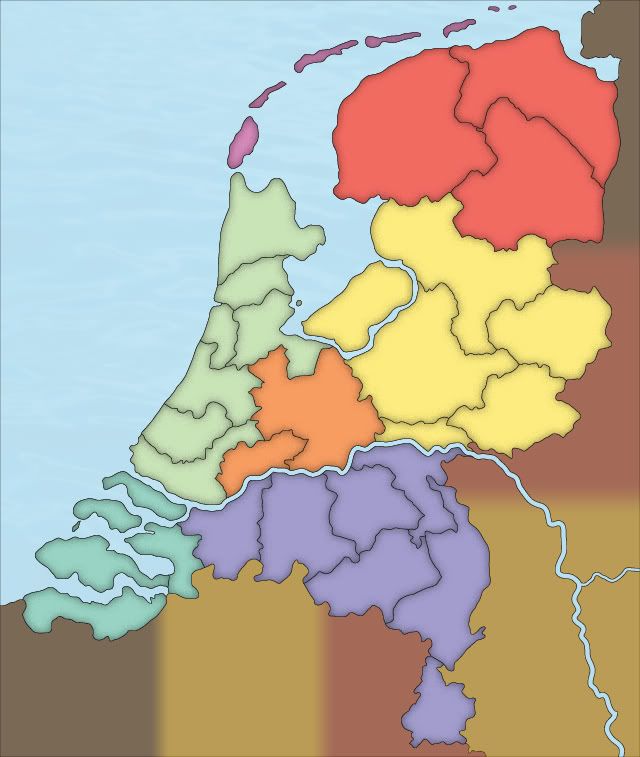
is this an improvement or should i go in another direction?
the look i have now is
is this an improvement or should i go in another direction?
- Wed Jan 06, 2010 6:50 am
- Forum: Melting Pot: Map Ideas
- Topic: 6PK World Cities 1
- Replies: 57
- Views: 8281
Re: 6PK World Cities 1
yeah the frames is what i meant i think they are too flashy and take attention away from the map itselfcairnswk wrote:you mean the frames of the four images in each corner...Lone.prophet wrote:its a great idea for sure and the idea of the roundness is
