FIXED :
HUD now contains Map Inspect and My Cards sections.
Terminator/Elimination Summary now formatted as Chat/Log
Fix for Red Clocks.
Fix for My Games Clocks.
Z-index fix for ClickableMaps
removed V:
Min Form Width changed to Min HUD Width...
BR Support. (I.e. support for more than 8 players for hovers etc)
Fix for Team Summary in 4 players doubles with fog!
Scrollable RightSideMenu for BR games...
Fixed "2 villages" bug.
-- NEW MENU --
At the moment the BOB menu is horrifically big...
* Map Opacity: 100%
* Map Align Left: 0 px
* Map Align Top: 0 px
* Text Map: Off
* Jump to Map: Off
* Stats: Extended
* Confirm Phase End: On
* Confirm AutoAttack: On
* Confirm Deploy: Off
* Map Inspect: On
* Clock Format: am/pm
* HUD: On
* Min Form Width: 600
* Hide Menu: Off
* Help/Info
* Latest Version Installed
All these are map specific options.
Map Options
* Map Opacity
* Map Align Top
* Map Aligh Left
All these are global View like settings
View Options
* Stats: Extended
* Map Inspect: On
* Text Map: Off
* Clock Format: am/pm
* Jump to Map: Off
* HUD: On
* * Min Form Width: 600
- Special note - Min Form Width is only applicable when HUD is ON.
All these options are to do with the Confirmation buttons.
Confirmation Options
* Confirm Phase End: On
* Confirm AutoAttack: On
* Confirm Deploy: Off
Which leaves the following
* Hide Menu: Off
* Help/Info
* Latest Version Installed
Hide Menu - needs to be always visible - so that people can turn it off...
As does Help/Info.
And latest Version too.
BOB Menu 4.2.1
* Map Options
* View Options
* Confirmations
* Hide Menu
* Help/info
* Latest Version Installed
To access the settings you need to click on the headers - and the settings will appear below...
Click again to hide.
If you move your mouse away from the side bar - then the menus will collapse.
If you select a new menu - then the other menus will hide.
I just noticed that when the countdown on the right side of the game screen gets to the point where it turns red and flashes, it disappears if BOB is enabled. I am not sure if many people pay attention to this, but I just thought I would point it out.
EDIT: Sorry about that, did not see that in the update list. Great work.
Last edited by lancehoch on Wed Feb 06, 2008 4:54 pm, edited 1 time in total.
lancehoch wrote:I just noticed that when the countdown on the right side of the game screen gets to the point where it turns red and flashes, it disappears if BOB is enabled. I am not sure if many people pay attention to this, but I just thought I would point it out.
That has JUST been fixed by the latest version (Points to huge post above)...
I seem to have Map Inspect: in my HUD just below the start turn button now. Not the actual inspection, just those words.
If I had a world of my own, everything would be nonsense. Nothing would be what it is, because everything would be what it isn't. And contrary wise, what is, it wouldn't be. And what it wouldn't be, it would. You see?
suggestion: is it possible to make the Game Log, Game Chat, and Elim Summary boxes draggable .... just like different parts of a facebook profile? There are some hi-chat games where it's annoying to have to scroll all the way down to the chat box every time I refresh the page just to see if somebody has said something, so I thought it would really useful if I could drag the chat box and dock it to the side on the right (long and narrow) so that I can see it with my map at the same time. beyind that, it would be nice to be able to drag all the boxes around to sort their order on the page or to be able to dock them onto the side. Does this make sense?
EDIT: if the above suggestion is not good, can you at least move the elimination summary to go below the game chat?
Score: 1739
Games: 88 Completed, 52 (59%) Won
#1302/21963
suggestion: is it possible to make the Game Log, Game Chat, and Elim Summary boxes draggable .... just like different parts of a facebook profile? There are some hi-chat games where it's annoying to have to scroll all the way down to the chat box every time I refresh the page just to see if somebody has said something, so I thought it would really useful if I could drag the chat box and dock it to the side on the right (long and narrow) so that I can see it with my map at the same time. beyind that, it would be nice to be able to drag all the boxes around to sort their order on the page or to be able to dock them onto the side. Does this make sense?
EDIT: if the above suggestion is not good, can you at least move the elimination summary to go below the game chat?
I won't be adding this sort of stuff to BOB - however I can tell you - just to get some anticipation going - a new script is well in the works for something like this...
chewyman wrote:I seem to have Map Inspect: in my HUD just below the start turn button now. Not the actual inspection, just those words.
Indeed - the HUD now has Map Inspect and Cards - if you roll over a hover then the inspection will appear in your HUD.
C.
Oh now I get it, I was playing a no cards game at the time
Nice feature, well done as always!
If I had a world of my own, everything would be nonsense. Nothing would be what it is, because everything would be what it isn't. And contrary wise, what is, it wouldn't be. And what it wouldn't be, it would. You see?
chewyman wrote:I seem to have Map Inspect: in my HUD just below the start turn button now. Not the actual inspection, just those words.
Indeed - the HUD now has Map Inspect and Cards - if you roll over a hover then the inspection will appear in your HUD.
C.
Oh now I get it, I was playing a no cards game at the time
Nice feature, well done as always!
Yeah - We decided that Cards - and Map inspect are necessary in the HUD - as if you hover over a territory with the HUD - often you are hiding the map inspect...
And as there are hovers in the Cards - then they need to be shown too...
I really liked the way that turned out...
(Note the cards have to go below map inspect - because map inspect expands upwards and you can cause a loop of hovering on a card and map inspect growing upwards - note you can still do this if you're hovering at the bottom of the map)
got on cc today and ive lost my bob menu and everything all the extended stats etc. only thing left is the card map inspect thing ie
if its flat red=4 etc
or if its esc the next redemption value
lord voldemort wrote:got on cc today and ive lost my bob menu and everything all the extended stats etc. only thing left is the card map inspect thing ie
if its flat red=4 etc
or if its esc the next redemption value
This isn't a very good description of your problem...
yucky.....ive cleared my cache. no dice....and i cant really be arsed reinstalling monkey and ff....meh ill go without...its only the laptop. i just want to watch tv at the same time lol
lord voldemort wrote:yucky.....ive cleared my cache. no dice....and i cant really be arsed reinstalling monkey and ff....meh ill go without...its only the laptop. i just want to watch tv at the same time lol
Question...I have clicky maps + AJAX BOB installed, but when I turn off map inspect (its messing up on some maps, going vertical instead of horizontal) I lose the box light up feature when I mouse over armies...is there any way to put map inspect back where it was off the HUD? (I also lose the pointer turning into a hand when mousing over territories when I disable map inspect)
Question...I have clicky maps + AJAX BOB installed, but when I turn off map inspect (its messing up on some maps, going vertical instead of horizontal) I lose the box light up feature when I mouse over armies...is there any way to put map inspect back where it was off the HUD? (I also lose the pointer turning into a hand when mousing over territories when I disable map inspect)
Thanks!
Map Inspect is staying in the HUD - as it's more useful there...
the "box light up feature" is map inspect...
What does "going vertical instead of horizontal" mean?
Not sure what you mean by pointer turning into a hand? It might be that you need a newer version of Clickable Maps.
I've gotta BOB Prob for ya, yeti:
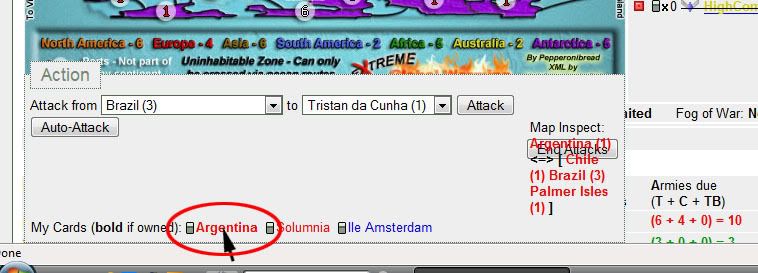
When I hover over a territory name (in the My Cards section) with my mouse, the Map Inspect appears on the floating menu, but shoved over to the right over the End Attacks button.
Here's a screenshot:
yeti_c wrote:
Map Inspect is staying in the HUD - as it's more useful there...
the "box light up feature" is map inspect...
What does "going vertical instead of horizontal" mean?
Not sure what you mean by pointer turning into a hand? It might be that you need a newer version of Clickable Maps.
C.
Lol Pepperonibread hit it right on the nose, see how map inspect goes vertical instead of horizontal? But since you gave him a fix, it must mean it'll work for me too Thanks for the fast update Yeti and sorry i couldn't explain it better...not very good with images >.<
sanosuke wrote:
Lol Pepperonibread hit it right on the nose, see how map inspect goes vertical instead of horizontal? But since you gave him a fix, it must mean it'll work for me too Thanks for the fast update Yeti and sorry i couldn't explain it better...not very good with images >.<













 Thanks for the fast update Yeti and sorry i couldn't explain it better...not very good with images >.<