

Chinese Checkers [Quenched] May '07 re-opener?
Moderator: Cartographers
Forum rules
Please read the Community Guidelines before posting.
Please read the Community Guidelines before posting.


2 things.
1) The triangles I think should be 3 per each.
2) An idea, how about if you own all of the B's you get a bonus.
1) The triangles I think should be 3 per each.
2) An idea, how about if you own all of the B's you get a bonus.
Vote: Mandy
Eddie35: hi everyone
Serbia: YOU IDIOT! What is THAT supposed to be? Are you even TRYING to play this game?! Kill the idiot NOW please!
Eddie35: hi everyone
Serbia: YOU IDIOT! What is THAT supposed to be? Are you even TRYING to play this game?! Kill the idiot NOW please!
Skoffin wrote: So um.. er... I'll be honest, I don't know what the f*ck to do from here. Goddamnit chu.
Try these on for size... got a favorite? I kind of like the white-to-grey circles on the right. Possibilities are limitless.Lone.prophet wrote:the "glow" from the armie shades annoy me u mind making them solid?
I threw on a radial gradiant border around the entire board... not sure it achieves the desired effect. I haven't used photoshop since 1993, so I'm re-learning as I go. More to come later.
Also dropped the bonuses back down to three, and removed the redundant bonus info.
-
reverend_kyle

- Posts: 9250
- Joined: Tue Mar 21, 2006 4:08 pm
- Location: 1000 post club
- Contact:
 I think everything looks good.
-
Lone.prophet
- Posts: 1467
- Joined: Thu Oct 12, 2006 4:37 pm
- Location: Your basement Muahaha
-
Bad Speler
- Posts: 1027
- Joined: Fri Jun 02, 2006 8:16 pm
- Gender: Male
- Location: Ottawa
- Contact:


-
cowshrptrn
- Posts: 838
- Joined: Thu Aug 17, 2006 1:15 pm
- Location: wouldn't YOU like to know....

-
AndyDufresne

- Posts: 24919
- Joined: Fri Mar 03, 2006 8:22 pm
- Location: A Banana Palm in Zihuatanejo
- Contact:
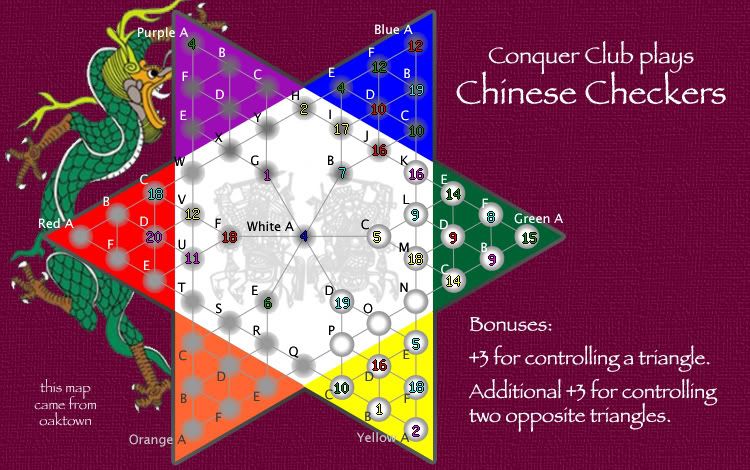
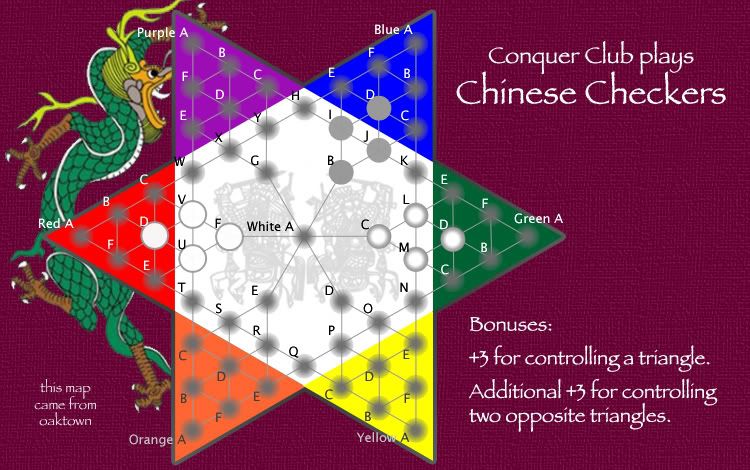
Three options for the army cicles:
1. original shaded gradiant circle (blue and purple part of the board)
2. white circle with gradiant border (green and yellow triangles)
3. lightened version of original circle (orange and red)
My hope was to give the effect of a concave space as per old chinese checkers boards... I think the white circle is a nod to that effect, and is by far the easiest to read.
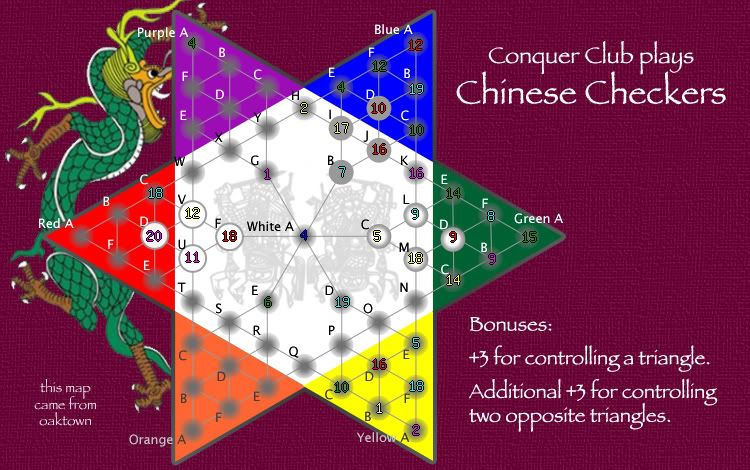
I still need to work on lining up the numbers a bit.
Last edited by oaktown on Mon Jan 08, 2007 1:10 am, edited 1 time in total.
-
reverend_kyle
- Posts: 9250
- Joined: Tue Mar 21, 2006 4:08 pm
- Location: 1000 post club
- Contact:
If that was your aim then definately 2. Making the board more 3D might help that effect also.oaktown wrote:Three options for the army cicles:
1. original shaded gradiant circle (blue and purple part of the board)
2. white circle with gradiant border (green and yellow triangles)
3. lightened version of original circle (orange and red)
My hope was to give the effect of a concave space as per old chinese checkers boards... I think the white circle is a nod to that effect, and is by far the easiest to read.
I still need to work on lining up the numbers a bit.

I could make 'em a bit bigger - also, I haven't mastered settings the coordinates, so few of the numbers are correctly centered. That will work itself out over time.Wisse wrote:i like the white ones if the numbers do fit in there exactly, they don't now...
Once I've settled on a circle I'll work on making the entire map seem more 3-D, as it is very flat right now.
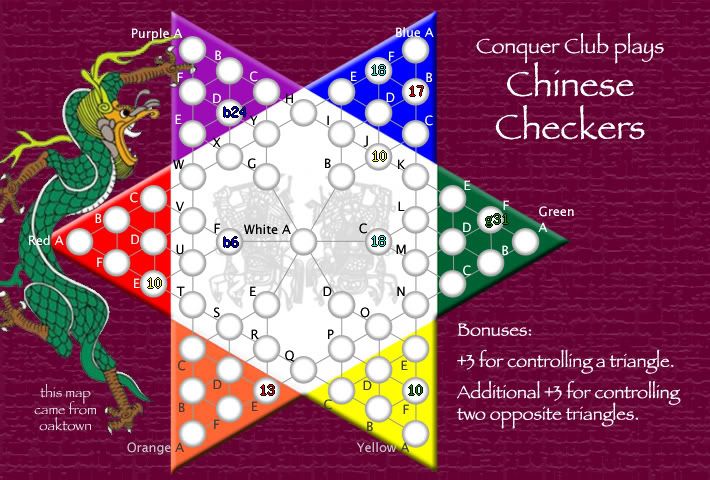
OK, here's the map with the popular white army circles. The circles are a bit larger, to fit the numbers fully.
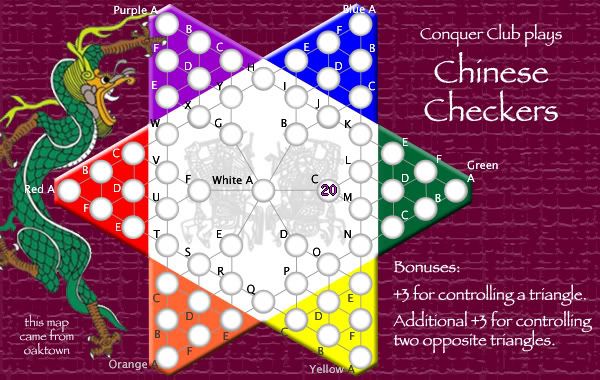
And here's what the small version could potentially look like:

The map assist tool was fine for dropping coordinates in the XML - I just didn't know where the targets should be. I could certainly do it in photoshop, which gives x-y coordinates, but I'm not going to waste more time on that until I know I have the map right - there are still changes ahead.
And here's what the small version could potentially look like:
Photoshop - which is a daily battle. The last time I used photoshop it was version 3.0 on my Mac IIx.KEYOGI wrote:What program are you using for making the map? I came up with a way in Photoshop to get all my numbers centred the first time with the exception of the errors in the xml tester.
The map assist tool was fine for dropping coordinates in the XML - I just didn't know where the targets should be. I could certainly do it in photoshop, which gives x-y coordinates, but I'm not going to waste more time on that until I know I have the map right - there are still changes ahead.
48 total posts since I started (some of which are by me) and nothing in the past week... I'm happy to continue working on this map and complete the XML, but I'm thinking there may not be enough interest to devote any more of my time to it. I have other ideas I want to float, so unless I'm convinced that anybody thinks that Chinese Checkers is a playable map idea I may turn my attention to something new.
So, Chinese Checkers: to be, or not to be??
And if you think I should continue, please give me some feedback on where to go next... I don't want this to be one of those maps that gets kicked around for months and never gets anywhere.
Thanks.
So, Chinese Checkers: to be, or not to be??
And if you think I should continue, please give me some feedback on where to go next... I don't want this to be one of those maps that gets kicked around for months and never gets anywhere.
Thanks.