[Tutorial] How to draw mountains (Photoshop)

How to make a map. Official Handbook, Guides, Tutorials and more...

Moderator: Cartographers

Forum rules
Please read the Community Guidelines before posting.
Post Reply
User avatar
RjBeals
Posts: 2506
Joined: Mon Nov 20, 2006 5:17 pm
Location: South Carolina, USA
Contact:

[Tutorial] How to draw mountains (Photoshop)

Post by RjBeals »

This tutorial is not what I intended - but I'll post it anyway. These mountains sort of came
out abstract and sort of water-color painting style. But I'll post my screenshots and psd
anyway. I just sort of created these as I went.

I started with a background layer. I added a new layer and drew a curved line.
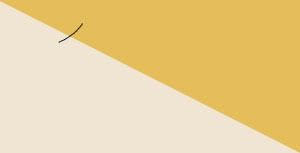
Image

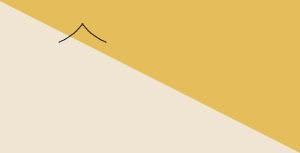
I duplicated that layer, then flipped horizontal, then positioned to make the mountain.
Image

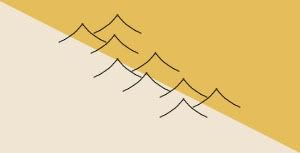
Then I duplicated that layer 9 times, and positioned those mountains so...
Image

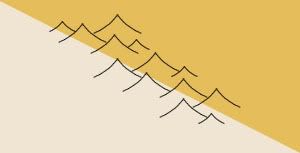
Then I added a few smaller mountains.
Image

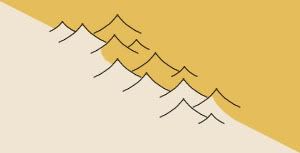
Then I adjusted the background colors so they were not a hard edge.
Normally a map wouldn't have a hard diagonal line for a border. Also, I didn't add the actual
border along the colors. I forgot, so it looks a little strange with the mountain borders.
Image

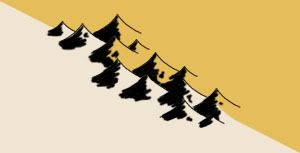
So here I took a 4 or 5 pixel brush and just painted black along the sides of the mountains.
I was being a little quick with my strokes so it would look a little natural. I actually like them
at this point. It looks like a pen and ink style map. Maybe in the Japanese tradition. (New Layer)
And.. looking back, I didn't need to adjust those backgrounds pattern, cause the black covered them anyway.
Image

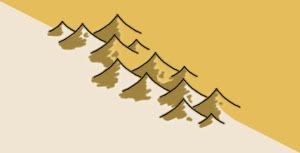
But instead I added a color to that layer. A brownish color, which is meant to blend into the
color scheme of those 2 map background colors.
Image

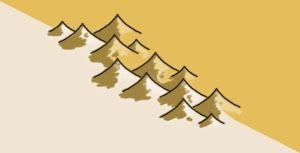
I also did something similar to add highlights. This is another new layer. I dropped the opacity also.
Image

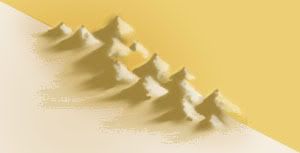
Okay here's where things take a turn. I didn't like the hard borders so I hid the border layer.
The mountains looked okay without. But I wanted them to blend into the map more, so I used
the smudge tool. I just smudged all the edges down to give the effect you see below.
I also added another black shadow layer, which was just a thick brush along the shadow side
of the mountains, lots of gaussian blur, blend as overlay, and opacity real low - like 10 or 20.
Image

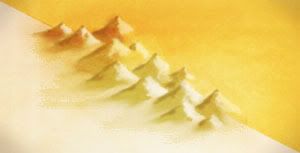
Of course, to give it something special I added the grungy overlay to the whole thing.
I'm noticing that many of the newer maps in production have this effect, and they are
looking A+! Anyway - here's what I came up with. Not necessarily great for CC maps, but kind
of cool nevertheless.
Image
Image

Here's the file (zipped PSD CS3): http://www.rjbeals.com/files/mount-rjb.zip

Image
LED ZEPPELINER
Posts: 1088
Joined: Tue Nov 25, 2008 10:09 pm

Re: Abstract Mountains.

Post by LED ZEPPELINER »

awesome, as usual
User avatar
InkL0sed
Posts: 2370
Joined: Sat Jun 23, 2007 4:06 pm
Gender: Male
Location: underwater
Contact:

Re: Abstract Mountains.

Post by InkL0sed »

Very, very cool!
User avatar
AndyDufresne
Posts: 24935
Joined: Fri Mar 03, 2006 8:22 pm
Location: A Banana Palm in Zihuatanejo
Contact:

Re: Abstract Mountains.

Post by AndyDufresne »

I love both the finished product, but also that first ink style...:)


--Andy
User avatar
InkL0sed
Posts: 2370
Joined: Sat Jun 23, 2007 4:06 pm
Gender: Male
Location: underwater
Contact:

Re: Abstract Mountains.

Post by InkL0sed »

Ink style? I had nothing to do with this! ;)
bryguy
Posts: 4381
Joined: Tue Aug 07, 2007 8:50 am
Location: Lost in a Jigsaw

Re: Abstract Mountains.

Post by bryguy »

InkL0sed wrote:Ink style? I had nothing to do with this! ;)
LOL that got me laughing!! :lol: :lol: :lol:


An excellent tutorial RJ! Ive really gotta try this sometime!
User avatar
yeti_c
Posts: 9624
Joined: Thu Jan 04, 2007 9:02 am
Gender: Male

Re: Abstract Mountains.

Post by yeti_c »

These look cool...
Image

f*ck me these look awesome...
Image

WOW...
Image

Great job again RJ.

C.
Image
Highest score : 2297
User avatar
sailorseal
Posts: 2735
Joined: Sun May 25, 2008 1:49 pm
Gender: Male
Location: conquerclub.com

Re: Abstract Mountains.

Post by sailorseal »

To anyone who is making a sand landscape map I recommend these mountains
bryguy
Posts: 4381
Joined: Tue Aug 07, 2007 8:50 am
Location: Lost in a Jigsaw

Re: Abstract Mountains.

Post by bryguy »

sailorseal wrote:To anyone who is making a sand landscape map I recommend these mountains

lol yes I agree, but it could also probably be done with different colors, could it not?
User avatar
mibi
Posts: 3350
Joined: Thu Mar 01, 2007 8:19 pm
Location: The Great State of Vermont
Contact:

Re: Abstract Mountains.

Post by mibi »

of course it helps to have RJ's skillz.
User avatar
The Neon Peon
Posts: 2342
Joined: Sat Jun 14, 2008 12:49 pm
Gender: Male

Re: Abstract Mountains.

Post by The Neon Peon »

In my opinion, lack should start paying rj so he will make more maps.
User avatar
wcaclimbing
Posts: 5598
Joined: Fri May 12, 2006 10:09 pm
Location: In your quantum box....Maybe.
Contact:

Re: Abstract Mountains.

Post by wcaclimbing »

RjBeals wrote: Image

Image
...grunge always makes things look better.
I'll have to try that more.
Image
bryguy
Posts: 4381
Joined: Tue Aug 07, 2007 8:50 am
Location: Lost in a Jigsaw

Re: Abstract Mountains.

Post by bryguy »

mibi wrote:of course it helps to have RJ's skillz.

lol I dont have RJ's skillz, yet (with slight tweaking) I can manage to make these in GIMP :)

Edit: Heres my attempt (my best at least :lol: ):
Image
Post Reply

Return to “Tools & Guides”