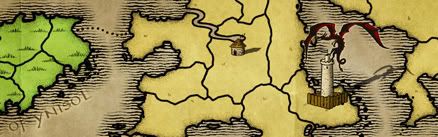
Are you really just trying it without shadows so you can get out of the tedious centralizing?

--Andy


Moderator: Cartographers


No. Not neccecarily. I just had an epiphny regarding the shadows necessity.AndyDufresne wrote: Are you really just trying it without shadows so you can get out of the tedious centralizing?
--Andy

AndyDufresne wrote:I agree with Sully, some of colors can be a little clashing. You clould mess with all the background colors, or use the shadows. I think the shadows add a professional appeal and look to it all.
Are you really just trying it without shadows so you can get out of the tedious centralizing?
--Andy

 [/url] Clicky Either One

I'm dealing with circles and coordinates this afternoon myself. I've found that in Photoshop if you drag out a guide it will snap to the center of the circle, and the info window gives you the coordinates of that guide. Then of course you need to subtract 3 from the X coordinates and and 23 to the Y coordinates to make it CC-friendly. With a few exceptions where I made mistakes with my numbers, I nailed the coordinates the first time out.sully800 wrote:I have seen this army shadow centering become a problem on several maps now, and it seems like people are perhaps going about it the wrong way.