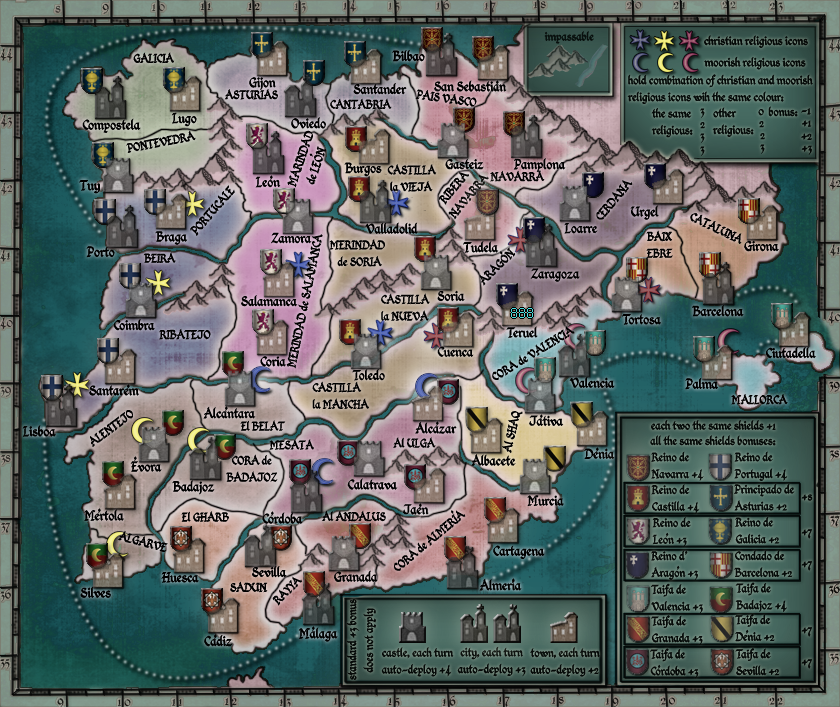
before you continue on any farther you need to know one major rule: Drawing the map Large and then shrinking it to make the small map is the best route to pursue. Making the map small and expanding it to be large is the worst idea ever.
My general plan, when making a new map, is to make the large version first and then shrink it down to small size to make sure everything fits. I take notes on what will have to change, usually Text size, and I make sure that the numbers will fit with everything on the small map. I save that small map and then ignore it until I hit the graphics workshop. All work should be done on the large map at this point.
So bring back the large and lets see what we can do about this blurriness.
TaCktiX wrote:I have one major beef with this map: it all looks blurry. I have a crystal-clear 1080p 24" display, and I can barely read any of the map. Please fix that ASAP, and I'll add some more comments for other improvements to the map (when it doesn't hurt my eyes to read).
Seconded. the text needs to be sharper.
Thanks to the CC staff for the perma-ban on ۩░▒▓₪№™℮₪▓▒░۩!
Sorry, but the rivers are still not standing out enough. Try making them a dark blue, it doesn't matter if they're different shade from the ocean... in the places where river meets ocean you can put a gradient so the colour changes smoothly from river to ocean.
fumandomuerte wrote:
Seconded. the text needs to be sharper.
for every text I choose "sharpe". what more could I do?
My suggestion is that when resizing the big map (where text is "sharp" and legible) be sure of having it as a vector. Here's an example:
Original:
Resized (75%) from raster text:
Resized (75%) from vectorial text:
Thanks to the CC staff for the perma-ban on ۩░▒▓₪№™℮₪▓▒░۩!
fumandomuerte wrote:
My suggestion is that when resizing the big map (where text is "sharp" and legible) be sure of having it as a vector. Here's an example:
Original:
Resized (75%) from raster text:
Resized (75%) from vectorial text:
Vector images are made up of many individual, scalable objects. These objects are defined by mathematical equations rather than pixels, so they always render at the highest quality. Objects may consist of lines, curves, and shapes with editable attributes such as color, fill, and outline. Changing the attributes of a vector object does not effect the object itself. You can freely change any number of object attributes without destroying the basic object. An object can be modified not only by changing its attributes, but also by shaping and transforming it using nodes and control handles.
Because they're scalable, vector-based images are resolution independent. You can increase and decrease the size of vector images to any degree and your lines will remain crisp and sharp, both on screen and in print. Fonts are a type of vector object.
Another advantage of vector images is that they're not restricted to a rectangular shape like bitmaps. Vector objects can be placed over other objects, and the object below will show through.
Thanks to the CC staff for the perma-ban on ۩░▒▓₪№™℮₪▓▒░۩!
fumandomuerte wrote:just be sure that your text is being written on a vector layer
Kickass avi, right the fruck on !!!
BTW, you should have entered the Foundry Medals comp. You would have won hands down with a set of that style.
Yeah, there should be medals for other great map contributors such as WidowMakers, oaktown & qwert and the rest of the cartographers that have succesfully developed maps.
It would be awesome to have 4 categories, each one honoring these 3 great CA along with Cairnswk.
Thanks to the CC staff for the perma-ban on ۩░▒▓₪№™℮₪▓▒░۩!
fumandomuerte wrote:just be sure that your text is being written on a vector layer
Kickass avi, right the fruck on !!!
BTW, you should have entered the Foundry Medals comp. You would have won hands down with a set of that style.
Yeah, there should be medals for other great map contributors such as WidowMakers, oaktown & qwert and the rest of the cartographers that have succesfully developed maps.
It would be awesome to have 4 categories, each one honoring these 3 great CA along with Cairnswk.
When you insert text or a shape there should be a checking box showing something like "create as a vector" (I use Corel Paint Shop Pro X, but I'm sure there should be a similar option in other software).
fumandomuerte wrote:When you insert text or a shape there should be a checking box showing something like "create as a vector" (I use Corel Paint Shop Pro X, but I'm sure there should be a similar option in other software).
I use Photoshop and there is nothing as you said / or I can not find it - what is probably the problem
fumandomuerte wrote:
Sorry for the SPAM theBastard
If you select your text and then go up to Layer menu up top, then to "rasterize" it will turn the layer from a text layer to any old image layer. It would turn the text layer (vector based) to pixel based (regular image). Don't worry about it, all your text layers are all ready as vectors.










 Cairnswk
 WidowMakers
 Oaktown
 Qwert
Qwert