Transforming a topological map into a traditional one?

Topics that are not maps. Discuss general map making concepts, techniques, contests, etc, here.

Moderator: Cartographers

Forum rules
Please read the Community Guidelines before posting.
Post Reply
User avatar
InkL0sed
Posts: 2370
Joined: Sat Jun 23, 2007 4:06 pm
Gender: Male
Location: underwater
Contact:

Transforming a topological map into a traditional one?

Post by InkL0sed »

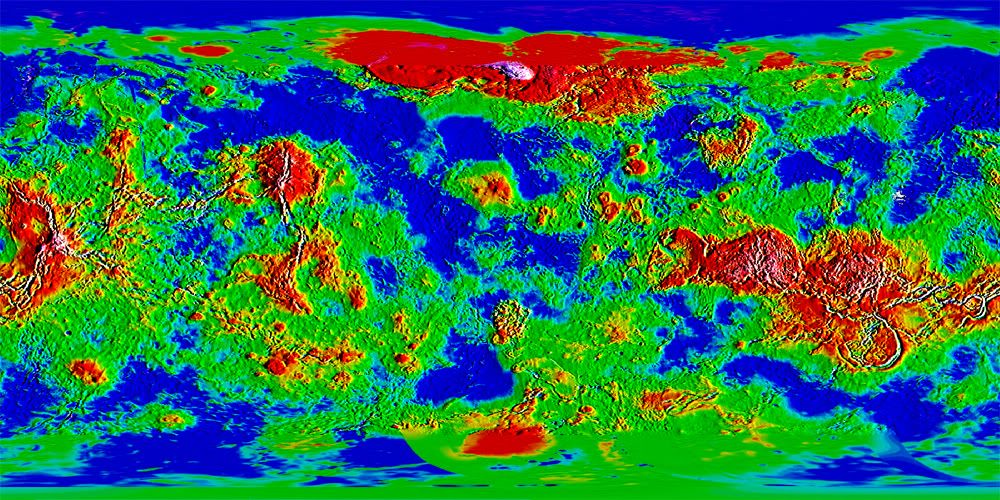
How would you, for instance, transform this topological map of Venus into one with normal sea/land borders?

Venus doesn't have an ocean of course, so the answer to my question might be quite complex. How would you do it assuming different sea levels? Is that possible?
Click image to enlarge.
image
User avatar
ender516
Posts: 4455
Joined: Wed Dec 17, 2008 6:07 pm
Gender: Male
Location: Waterloo, Ontario

Re: Transforming a topological map into a traditional one?

Post by ender516 »

I have almost no experience with graphics software, but as I understand it, you can select by colour, so if you were to select everything from red through green as land, and cyan through violet as ocean, I think it would be a start. With a selection, you should be able to create an outline which would be your shores. Erase insignificantly small islands and you have a good start. After that, make use of the natural highlands as impassables. Breaking up open areas is a bit more problematic, but I have seen comments in the Foundry that suggest that when creating maps of imaginary areas (fantasy or sci-fi) the terrain can suggest where habitation would occur most readily (natural harbours, box valleys, etc.) and that territories grow from these points.
User avatar
porkenbeans
Posts: 2546
Joined: Mon Sep 10, 2007 4:06 pm

Re: Transforming a topological map into a traditional one?

Post by porkenbeans »

there might be something useful here. http://www.conquerclub.com/forum/viewto ... 5#p2452052
Image
User avatar
oaktown
Posts: 4451
Joined: Sun Dec 03, 2006 9:24 pm
Location: majorcommand

Re: Transforming a topological map into a traditional one?

Post by oaktown »

For starters you need to figure out what your threshold will be for land and sea. Right now you have a lot of shades of green and blue so exactly where your coastlines lie is really hard to pinpoint. My first move would be to drive this down to a few simpler colors by adjusting the levels - this gave me the added benefit of really highlighting where my mountains are going to go.
Click image to enlarge.
image
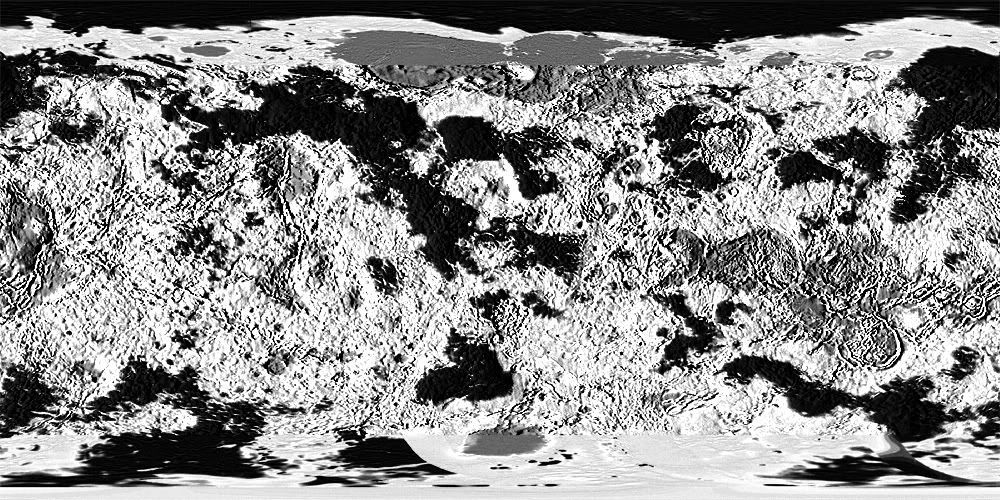
Looking back at this I probably didn't push it enough, but you get the idea. From here it's easier to start creating you continent layers... you could duplicate the layer, make it grayscale and drive it to line if you really wanted to simplify things. On the image below, black is water, everything else is land. Select your water, select inverse, and you've got your land selected.
Click image to enlarge.
image
If that looks like not enough water, just go back and adjust layers to different levels until you like the balance. This was all about 15 seconds worth of work.
Image
User avatar
natty dread
Posts: 12876
Joined: Fri Feb 08, 2008 8:58 pm
Location: just plain fucked

Re: Transforming a topological map into a traditional one?

Post by natty dread »

Simply changing it to black and white may not work since the luminosity seems to be constant, only the hue is changing...

Thus, I would simply transfer the hue channel to the luminosity channel to get it into a black and white height map. I'd take a few copies of that height map layer and put one aside as a spare. Then I would apply emboss/engrave on the layer - perhaps a few times on various depth settings to achieve an adjustable texture. Then I'd just put those layers on overlay with various opacities on top of the colour layer.

I'd take that spare height map layer, then apply a luminosity curve and select some few of the bottom levels - say the first hundred (my software uses a 0-255 scale) - and set them to zero. Then I'd use the magic wand with tolerance 0 to select all the black on that layer (all the colour we just set to zero) and I'd have a selection of the heights from 0 to 100, then I'd just fill that area with blue to make it into ocean.
Image
User avatar
natty dread
Posts: 12876
Joined: Fri Feb 08, 2008 8:58 pm
Location: just plain fucked

Re: Transforming a topological map into a traditional one?

Post by natty dread »

Ok here's what I got... didn't do anything fancy graphically, just a start with green land area and blue ocean... just a proof-of-concept if you will.
Click image to enlarge.
image
here's also the height map I made, someone might find it useful. In this image, black represents top height, while white represents bottom.
Click image to enlarge.
image
Image
User avatar
InkL0sed
Posts: 2370
Joined: Sat Jun 23, 2007 4:06 pm
Gender: Male
Location: underwater
Contact:

Re: Transforming a topological map into a traditional one?

Post by InkL0sed »

oaktown wrote:For starters you need to figure out what your threshold will be for land and sea. Right now you have a lot of shades of green and blue so exactly where your coastlines lie is really hard to pinpoint. My first move would be to drive this down to a few simpler colors by adjusting the levels - this gave me the added benefit of really highlighting where my mountains are going to go.
Click image to enlarge.
image
Looking back at this I probably didn't push it enough, but you get the idea. From here it's easier to start creating you continent layers... you could duplicate the layer, make it grayscale and drive it to line if you really wanted to simplify things. On the image below, black is water, everything else is land. Select your water, select inverse, and you've got your land selected.
Click image to enlarge.
image
If that looks like not enough water, just go back and adjust layers to different levels until you like the balance. This was all about 15 seconds worth of work.
What do you mean by levels? I see Levels in Adjustments, but that doesn't seem to be what you're talking about (I'm using CS3 btw).

natty_dread: looks great, I'll try out that technique later
User avatar
natty dread
Posts: 12876
Joined: Fri Feb 08, 2008 8:58 pm
Location: just plain fucked

Re: Transforming a topological map into a traditional one?

Post by natty dread »

Ok, here's something I made just for fun.
Click image to enlarge.
image
how I made it
Here, I took the black & white height map I made and made several copies of it.

First, I took one copy and used a tool called gradient mapping. It takes the luminosity channel (black to white) and maps it to another customized gradient. I made it from blue to green to grey, representing sea, land & mountains.

Then I took two other copies of the height map and made them into textures with emboss/engrave. One with depth 1 and one with 3, then put them on overlay and adjusted their opacities.

Then I took one more height map copy and gradient mapped it to black and white, 2 colours, so that in that layer sea is black and land is white. I made this layer invisible because it is only used as a mask, to select with the magic wand the land area. This selection I used to make a few bevels and outlines to accentuate the border between land and sea.

Lastly I shrinked the image to map size, so that it's 840 pixels wide. You can use this image for whatever purpose if you want, I don't know if it will be any use for anything, but if you can think of some use for it...
Image
User avatar
ender516
Posts: 4455
Joined: Wed Dec 17, 2008 6:07 pm
Gender: Male
Location: Waterloo, Ontario

Re: Transforming a topological map into a traditional one?

Post by ender516 »

Glad to see some real cartographers chiming in here. I knew the sort of thing to be done (pretty much what natty has whipped up), but didn't have the specific knowledge of the tools.

I hope this map has some success, but I fear it may go the way of the Mars maps that have taken this route. Perhaps a map that works like the Land and Sea map? That one is intriguing, and this picture reminds me of it somewhat.
Post Reply

Return to “Foundry Discussions”