Moderator: Cartographers

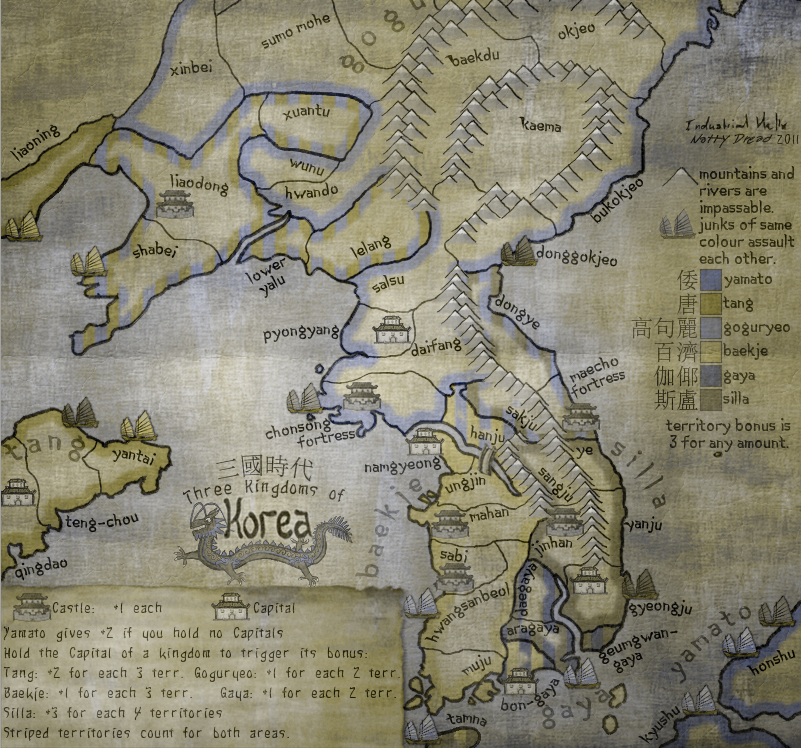
Yeah Dongbuyeo definitely sounds better. I wasn't even disputing that but everything else really looks oknatty_dread wrote:http://en.wikipedia.org/wiki/Dongbuyeo
http://en.wikipedia.org/wiki/Bukbuyeo#Dongbuyeo
Apparently Dongbuyeo would translate to "East Buyeo" which makes sense to me. "Donghuyeo" didn't bring any search results on google, so I have to assume Dongbuyeo is the correct sp.
Silvanus wrote:perch is a North Korean agent to infiltrate south Korean girls
Hangul,[nb 1] the Korean alphabet, is the native alphabet of the Korean language. It is a separate script from Hanja, the logographic Chinese characters which are also sometimes used to write Korean. It was created in the mid-15th century, and is now the official script of both North Korea and South Korea and is co-official in the Yanbian Korean Autonomous Prefecture of Jilin Province, People's Republic of China.


Come on natty, You have come this far. There is always a fix, you just need to find it.natty_dread wrote:Ok, how about you just take the map offline and substract me one medal or whatever.
Top Score:2403natty_dread wrote:I was wrong
I don't currently have the time to redraw the map, so if the current image is not good enough I'm afraid there's no choice but to scrap it.gimil wrote:Come on natty, You have come this far. There is always a fix, you just need to find it.natty_dread wrote:Ok, how about you just take the map offline and substract me one medal or whatever.

If you do not have the time now, can it not come out of beta till you do have the time to do it. Not sure how the foundry works in this situation. It would be a real shame if we lost this. I just love looking at it.natty_dread wrote:I don't currently have the time to redraw the map, so if the current image is not good enough I'm afraid there's no choice but to scrap it.

You'd guess wrong.DiM wrote:i'm not sure how natty made the image but i'm guessing it might be a very easy fix.
Nope, that won't cut it.simply take away the dark background and replace it with a lighter one.

jpg compression has nothing to do with the current problem of the map. the colours are washed out even on the png.natty_dread wrote:The thing is, as long as I don't have the possibility to compress my own JPEG:s, I have no way of knowing how the image that ends up on the site will look like. So I'm expected to blindly balance the colours of the image so that both normal-sighted and colourblind people won't have any problems with it. Sorry but that's impossible to do.
Which png are you looking at? The first post isn't up to date.DiM wrote:jpg compression has nothing to do with the current problem of the map. the colours are washed out even on the png.natty_dread wrote:The thing is, as long as I don't have the possibility to compress my own JPEG:s, I have no way of knowing how the image that ends up on the site will look like. So I'm expected to blindly balance the colours of the image so that both normal-sighted and colourblind people won't have any problems with it. Sorry but that's impossible to do.

Update it then. Btw i did my test on your last one, not the one you have on the OP.natty_dread wrote:Which png are you looking at? The first post isn't up to date
Ok, set the compression to 80. What about the other settings? Subsampling, DCT method, Smoothing, optimization? I have no idea which settings lack uses.thenobodies80 wrote:In any case if you want to emulate the CC compression, you have just to set it to 80% (btw it's an issue you know I'm working on), but as DiM said in this case the colors are the problem, not the compression.

while i'm not fond of how strong the colours are now, i'm pretty sure most people will prefer it over the old version:natty_dread wrote:Ok, here.
Top Score:2403natty_dread wrote:I was wrong
That's not the current version.DiM wrote:while i'm not fond of how strong the colours are now, i'm pretty sure most people will prefer it over the old version:natty_dread wrote:Ok, here.

You ask yourself about too many options. Don't worry about them, listen to me. Just set quality to 80%. (and don't use progressive images that are hateful)natty_dread wrote:Ok, set the compression to 80. What about the other settings? Subsampling, DCT method, Smoothing, optimization? I have no idea which settings lack uses.thenobodies80 wrote:In any case if you want to emulate the CC compression, you have just to set it to 80% (btw it's an issue you know I'm working on), but as DiM said in this case the colors are the problem, not the compression.
Ok, but those options are still there and I don't know what to set them so that the result becomes the same as what lackattack does.thenobodies80 wrote:You ask yourself about too many options. Don't worry about them, listen to me. Just set quality to 80%.
Actually I think the new version looks like crap. The colours are horribly bright and look like someone vomited on my screen.thenobodies80 wrote:The new version is much better, except for junks.


Top Score:2403natty_dread wrote:I was wrong