Moderator: Cartographers
OK, starting to feel like I'm being pulled in different directions here.Flapcake wrote:it's pretty obvious that your flag is a photo you've tried to adapt, I do not think it's pretty good, too vague and poor colors, a flag is something a nation are proud of and you certainly have to make it as nicely as possible to give it the credit it deserve.
How do I do that?Flapcake wrote:I have created a flag (you can use it as it is if you want or remodel it, its yours for free) just to give you an idea on how smoot you need to make your images, im also thinking about your icons/sigths.
Never leave the graphics to anyone else. Believe me, it gets easier over time and in the end, the satisfaction of playing a map you created is far better than all of the hours put into your first one.sempaispellcheck wrote:Should I just leave the graphics to someone else? I REALLY want to do this myself, but if you guys feel it would be better to have someone else do it, I could be OK with that.
I'm just getting a little frustrated.

Im sorry, It was not my intentions. It was only a suggestion on how to make the bagground, maby you have to find anohter way to do, maby like isaiah40 suggested, its all up to you.sempaispellcheck wrote:
OK, starting to feel like I'm being pulled in different directions here.
Wasn't planning on it. I certainly hope so.koontz1973 wrote:Never leave the graphics to anyone else. Believe me, it gets easier over time and in the end, the satisfaction of playing a map you created is far better than all of the hours put into your first one.
Yes, I have, but not until after I posted my second draft - which explains the difference between my second and third drafts.koontz1973 wrote:A couple of things for you then first. Have you read nattys gimp tutorials (both parts)?
Thanks for the offer. I will definitely take you up on it.koontz1973 wrote:Secondly, if you need to know anything about GIMP, post specific questions and I will try to answer them for you as clearly as I can.
Thank you. I will.koontz1973 wrote:Keep at it. You do have the makings of a map here, just not the know how, right now to pull it off.
koontz
And in the short run.isaiah40 wrote:My one suggestion would be to not worry about the small map for now, just concentrate on the large. In this way you don't have to do major changes to both maps, thereby making it easier for you in the long run.
Don't apologize, it's not your fault. Right now, I've basically been trying everything I can think of (which isn't much) and hoping something will work.Flapcake wrote:Im sorry, It was not my intentions. It was only a suggestion on how to make the bagground, maby you have to find anohter way to do, maby like isaiah40 suggested, its all up to you.sempaispellcheck wrote:
OK, starting to feel like I'm being pulled in different directions here.
Ah. OK, I'll play with that a bit and see what I get. Thank you!!Flapcake wrote:how im working is with filters, effects and the opacity for those, its about adding layers of effects, not to many and not to fewuse the blur/finger tool to smoot edges, add outerglow/drop shadow to ancor/integrate the icons/images in the base, so its kind of flow together.
the flag it did like this. start new layer in size of the map, select a vertical box in a third of the area the the left, make new copy of layer, fill with blue, do it again for the red. merge the 3 layers together, add "wave" effect from patters overlay and work with the waves size to find the setting you like. make copy of the layer and add a "dusty" effect from patters overlay, last I added from filter "twist" to make it kind of "zig zag" down the middel.
OK. Now I think I understand you.Flapcake wrote:I like your idea of a giant flag for baground, but your current choice of flag I dont like.
Flap

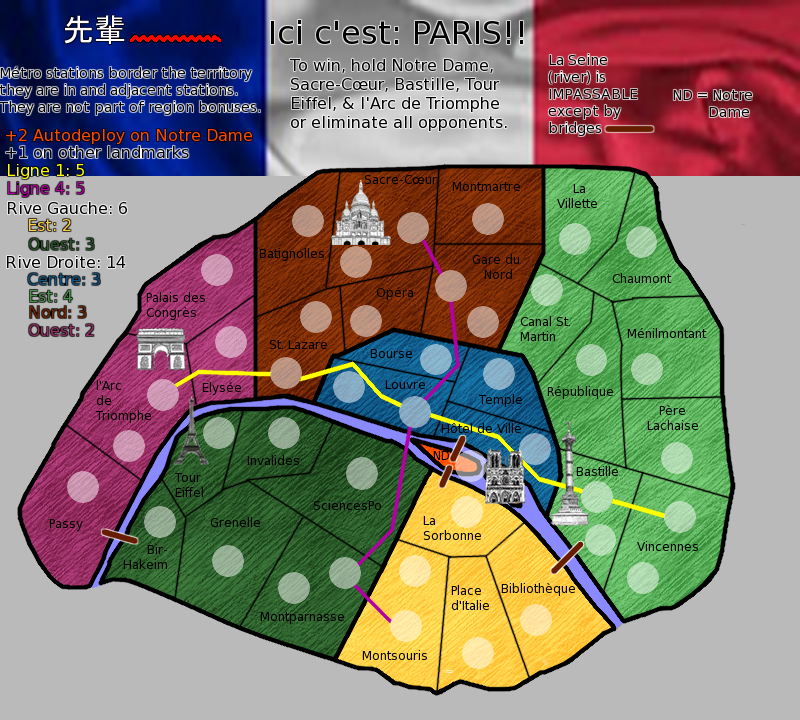
I rotated some of the territory names so they wouldn't spill over into other territories and cause confusion.koontz1973 wrote:OK, now that you are going to do the large only for now (and until you get the game play stamp),
here is a list of things to do for the next update to try and get this moving forward.
Text - On the map, the text is all over the place. Get it all to the same size and orientation. For now, have it all flat. Some looks like it is bolded, some not. Again, all text on the map needs to be identical.
I used the cloud render layer to add a texture to the map - as per natty's tutorial. What texture should I use, if not that one?koontz1973 wrote:Colours - Your colours are OK, but the green is way to dark and the others are just glaring. You have a layer which you have used cloud render on, delete this layer for now.
Try to add a texture to the map.
OK, that's an easy fix.koontz1973 wrote:Army number circles - lower the opacity to 50%


That was my initial idea, but isaiah said it detracted from the playable area somehow. He's got blue shoes, so I'll take his word for it. I tried lowering the opacity, but it didn't really look good.swimmerdude99 wrote:I haven't read through everything but I suggest you extend the flag to go all the way down the map's basis
I could. I kind of like the colors I have, though. We'll see.swimmerdude99 wrote:maybe a little less diverse colors? try to stick with more red, blue, white/gray territs so it isn't so diverse?
Thanks!koontz1973 wrote:Much better and much cleaner. I like it.
OK, I can do that. I'll probably have to draw something, though, since most of the images I've found online contain one or more of the landmarks already illustrated on the map itself.koontz1973 wrote:You legend are is very bland. Try to do something with it. Maybe the flag, or a nice picture of paris can be added to it.
OK. I'll do my best. It might take some time, though.koontz1973 wrote:Your pictures still need to be worked over. Try drawing them yourself. ... the best advice is to practise with your programme.

What if I moved the text down a little more so it didn't start in the flag? Or made the flag less wide, so it's kind of in the top right corner?ComposerNate wrote:-I generally like the look of the map itself a lot more than the legend. The text of the legend is pretty distracting and odd. Specifically, the way the part on the left starts in the flag but goes beyond it. I would probably vote for a return to the flag covering the full background, or at least a little more of it, enough to be standard flag proportions.
That's a good idea. I think I'll do that. Thank you.ComposerNate wrote:Another point about the text: I don't think the explanation of the ND abbreviation is necessary over on the right. You could work it in with the part on the left: +2 autodeploy on Notre Dame (ND)
The métro stations are connected by the métro lines, though. I would hope that would eliminate any confusion. I could switch the two circles so that the lower one was the métro station, though.ComposerNate wrote:-I can imagine it might be confusing to some players as to which territories they need to hold for the victory condition, because the army circle for l'Arc de Triomphe metro station is closer to the picture of the Arc than the circle for the territory itself (which is presumably the one that needs to be held). The same problem could occur to a lesser degree with Bastille and Sacre-Coeur.
Don't see why not. It might be a little more difficult, but I could figure it out.ComposerNate wrote:-The bridge symbol is a little bland. Maybe you could do something with a graphic of an actual Paris bridge?
That's the "sempai" in "sempaispellcheck."ComposerNate wrote:One more thing: what's the deal with the Asian characters in the upper left?
you are going to have to redo your whole legend from scratch. It is hard to read, looks blurred and is just plain ugly. Not to worry though, it is a very easy thing to fix as you have all of the elements there.sempaispellcheck wrote:What if I moved the text down a little more so it didn't start in the flag? Or made the flag less wide, so it's kind of in the top right corner?
If you managed to draw the island bigger (you do have room to make it bigger), you can remove the abbreviation completely.sempaispellcheck wrote:That's a good idea. I think I'll do that. Thank you.ComposerNate wrote:Another point about the text: I don't think the explanation of the ND abbreviation is necessary over on the right. You could work it in with the part on the left: +2 autodeploy on Notre Dame (ND)
Switching circles is not going to work. You are going to rethink this whole thing. You have three different types of territ and all have the same army circle. Go and have a look at Portland (http://www.conquerclub.com/forum/viewto ... 64&t=70975) to see a way of doing it. Not saying you should copy this but it is a lot clearer.sempaispellcheck wrote:The métro stations are connected by the métro lines, though. I would hope that would eliminate any confusion. I could switch the two circles so that the lower one was the métro station, though.ComposerNate wrote:-I can imagine it might be confusing to some players as to which territories they need to hold for the victory condition, because the army circle for l'Arc de Triomphe metro station is closer to the picture of the Arc than the circle for the territory itself (which is presumably the one that needs to be held). The same problem could occur to a lesser degree with Bastille and Sacre-Coeur.
Not to worry yet. This is an easy fix. Use the square select tool, make a square the right size and use the textures that came with Gimp to fill. Then rotate to the correct angle.sempaispellcheck wrote:Don't see why not. It might be a little more difficult, but I could figure it out.ComposerNate wrote:-The bridge symbol is a little bland. Maybe you could do something with a graphic of an actual Paris bridge?
Get rid of it. This is Paris, the city of love, onions and long bread. Not Chinese takeout.sempaispellcheck wrote:That's the "sempai" in "sempaispellcheck."ComposerNate wrote:One more thing: what's the deal with the Asian characters in the upper left?

It's Japanese.koontz1973 wrote:This is Paris, the city of love, onions and long bread. Not Chinese takeout.
No kidding.koontz1973 wrote:That should keep you busy for a while.
Chinese or Japanese take out, it all looks and tastes the same after a few pints.sempaispellcheck wrote:It's Japanese.koontz1973 wrote:This is Paris, the city of love, onions and long bread. Not Chinese takeout.![]()
No kidding.koontz1973 wrote:That should keep you busy for a while.![]()
I don't expect to get any work in on it this week, as it's Finals Week, but I should have a fair amount of time to work on it over the summer.

I tend to agree, I just said it more nicely.koontz1973 wrote:you are going to have to redo your whole legend from scratch. It is hard to read, looks blurred and is just plain ugly. Not to worry though, it is a very easy thing to fix as you have all of the elements there.sempaispellcheck wrote:What if I moved the text down a little more so it didn't start in the flag? Or made the flag less wide, so it's kind of in the top right corner?
Seine is the name of the river, not the French word for river. However, I tend to agree that rivers and bridges are self-explanatory. Everyone knows how they work so having them in the legend is probably unnecessary.koontz1973 wrote:Remove the translation of river and put a small portion of the river.
Having bridges there is self explanatory so remove this. Also, you can cross the river by the trains so is also wrong.
Agreed. If you have special types of army circles for the metro lines it will eliminate the confusion. I would still switch the "Arc de Triomphe" text with the (regular) circle, though, to make the circle closer to the graphic.koontz1973 wrote:Switching circles is not going to work. You are going to rethink this whole thing. You have three different types of territ and all have the same army circle. Go and have a look at Portland (http://www.conquerclub.com/forum/viewto ... 64&t=70975) to see a way of doing it. Not saying you should copy this but it is a lot clearer.sempaispellcheck wrote:The métro stations are connected by the métro lines, though. I would hope that would eliminate any confusion. I could switch the two circles so that the lower one was the métro station, though.ComposerNate wrote:-I can imagine it might be confusing to some players as to which territories they need to hold for the victory condition, because the army circle for l'Arc de Triomphe metro station is closer to the picture of the Arc than the circle for the territory itself (which is presumably the one that needs to be held). The same problem could occur to a lesser degree with Bastille and Sacre-Coeur.
Aha! Very clever sig! It should be smaller and at the bottom, though.sempaispellcheck wrote:That's the "sempai" in "sempaispellcheck."ComposerNate wrote:One more thing: what's the deal with the Asian characters in the upper left?