Moderator: Cartographers

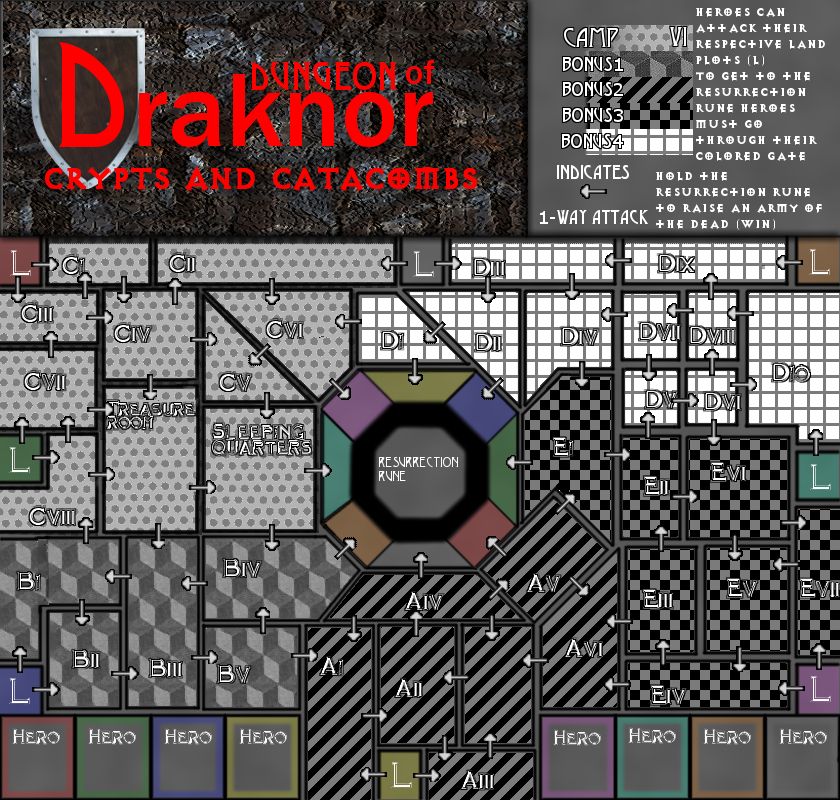
arrows will be added in the next versionnolefan5311 wrote:Please please please follow through with this.
A few opening thoughts:
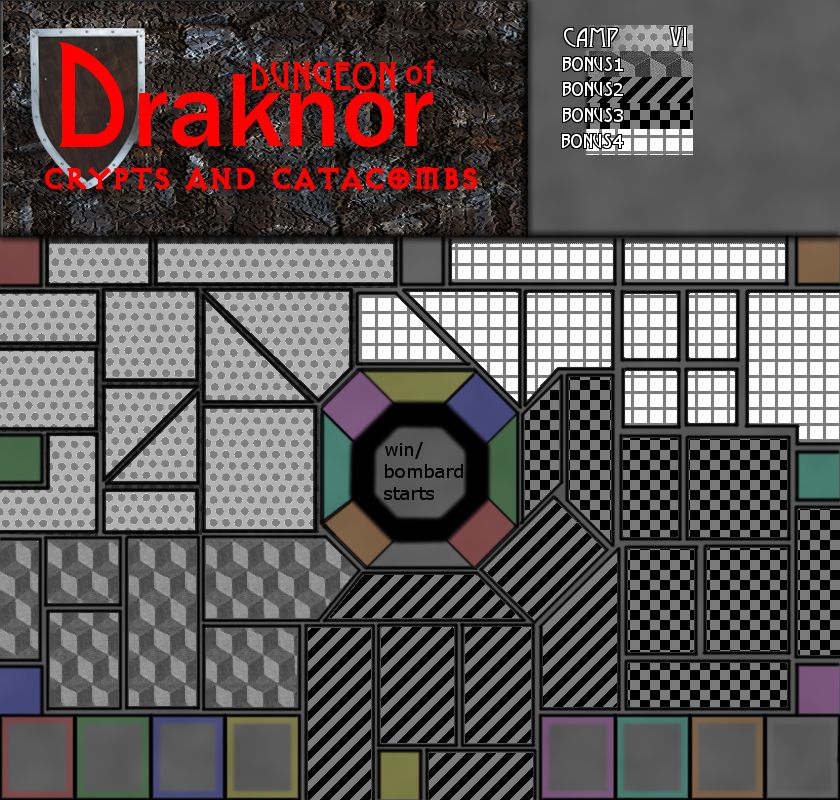
- If territories don't directly border each other, you will need to have arrows (similar to the original Draknor map) As is, its tough for me to tell which regions border which.
- Will there by bonuses?
- The territories in the corner have a significant disadvantage as they have quite a bit more territories to go through to get to the center.
- The colored regions in the corners will get no action and people will just fight over the colored regions closest to the starting positions. Are these intended to be starting positions as well?

Thats what pushed me over to get this outzimmah wrote:Since there also an update to allow for conditional borders, I think that would also do very well on this map.
Im up for the challenge!Victor Sullivan wrote:Just be careful on this one. Using the name of Draknor comes with very high expectations...
-Sully


title updated.koontz1973 wrote:crazymilkshake5, this has been talked about for so long now, you have a lot of very anxious people that will look over this with a find tooth comb.
Lets get some official things over with, then we can move on with the map.
Title of thread needs to be this so everyone can see the info.
Name of map - date of last update - page of last update - anything else. Please get yours changed.
Continents, bonuses and territ names. These need to be put on ASAP for it to be considered a draft. They can change but it makes things a lot easier when people know what part of the map they are talking about.
Last thing, legend, get some rules on there.
Now, back to the map. Are all players starting in the middle?
Coloured boxes at the bottom, what are these for?

[moved]Drafting Room Guidelines
To be considered a Working Draft a project must be more than just an idea; a Draft should have a clear thematic focus, a plan for how the gameplay will work, and a basic image which should include:
1. Territory Labels - temporary names or numbers will suffice, and are always open to change.
2. Borders/Paths/Impassables - it should be made clear where territories do/do not connect.
3. Bonus Areas - where combinations/groups of territories will award a bonus, this should be indicated on the map.
4. Legend - speculative bonus values and explanations of any attack rules or gameplay features.
Draft images should generally not be larger than 630x600px (small image) or 840x800px (large image).

got it matekoontz1973 wrote:crazymilkshake5, please do not take this the wrong way and feel that I am going to in any way stall this map. DoD is one of my fav maps, even though I have only played it a handful of time. Any and all help that you need, please just ask but right now, I am going to put this into the melting pot/ideas forum for a few reasons. Please read below.[moved]Drafting Room Guidelines
To be considered a Working Draft a project must be more than just an idea; a Draft should have a clear thematic focus, a plan for how the gameplay will work, and a basic image which should include:
1. Territory Labels - temporary names or numbers will suffice, and are always open to change.
2. Borders/Paths/Impassables - it should be made clear where territories do/do not connect.
3. Bonus Areas - where combinations/groups of territories will award a bonus, this should be indicated on the map.
4. Legend - speculative bonus values and explanations of any attack rules or gameplay features.
Draft images should generally not be larger than 630x600px (small image) or 840x800px (large image).
koontz

Couldn't have said it better myself. Good luck CMS.crazymilkshake5 wrote: What Makes This Map Worthy of Being Made: It is the second level of Draknor.
yikes. Indeed it does. It doesn't feel right using the Draknor name with WM's thumbs up. Good luck with this project -Victor Sullivan wrote:Just be careful on this one. Using the name of Draknor comes with very high expectations...


Currently using gimp, and i know i suck, lolkoontz1973 wrote:OK crazy, lets start at the beginning then and see this through to completion.
Graphics. What programme are you using as right now, they look bloody awful and make the map very hard to read. When I know, I can and will help. But I have a feeling you use GIMP.
Do you intend this to be like DoD1 and have players everywhere or more like feudal and have one starting position per player. Not clear on this at the moment.
Coloured territs around the rune attack the rune. Correct?
Coloured territs with the L on them. These are?
Coloured territs with Hero on them. These are?
When I know this, I can help further.


koontz1973 wrote:GIMP is good, you just need to know how to use it. Here I can and will give you lots of help throughout. Just post any questions or send them to me via PM and I can let you know my thoughts on how to do it.
Feudal is good. But this makes the balancing harder to do so you will be in GP longer. Just follow the advice given by the blue guys and they will not let you go wrong. As for hero to L, this is an atrocious idea. Why have two starting territs. Drop the hero ones. You can still have the conditional borders by holding the correct L territ to open them. This will give players an incentive to attack them to open new borders and close other players off.
Graphics. For now, I will leave the title to you to play with. And you do need to play with it. You need to learn GIMP like the rest of us.Lets play around with the playing board. Here is what I would like you to do and it should give you pretty good results.
Walls. Here is an image for you to look at. I have posted steps for you but you need to adjust things to your liking.
Top picture is step one and so on. Layers used - 3 (Ground, glow and wall layers)
1. Using the pencil in GIMP, you can find a size that suits but do not use the fuzzy ones. You need sharp edges for walls. Draw a line (when you have done a small part of it, you can copy and paste to get it done quicker). The pencil will not allow diagonals but there are none on your map that cannot be made at right angles.
2. When you have drawn all the walls, you can select all and use any texture you want here to fill in the walls. I used the GIMP paper one in the illustration.
3. Now comes the fun part. You need to create another layer under you wall layer (glow layer). Again, select all on the wall layer, go down to the glow layer. Select tab at the top. Grow and feather are what you need. My illustration is grow by 3, feather by 9. (Always this ratio. So a grow of 5 is feather of 15). Fill selection with black. You can change the opacity to make it lighter.
4. Floor layer, just fill with anything for now but make it one thing.
This will get you nice walls that look pretty dam good. Go and look at escape in the main foundry and you will see this over a whole map. There are other ways to do this but this is the quickest one I know.
Here is a place you can go for textures. Just download to your machine and use. All royalty free. Make sure you use royalty free only images.
http://www.cgtextures.com/
This guy on youtube is pretty good at explaining things and has lots of videos. Good thing for you to go and watch a few.
http://www.youtube.com/watch?v=E84BNlYvcNk