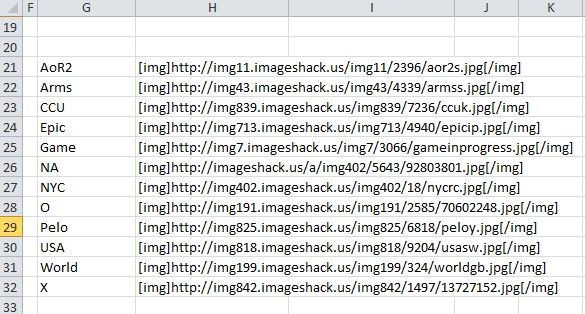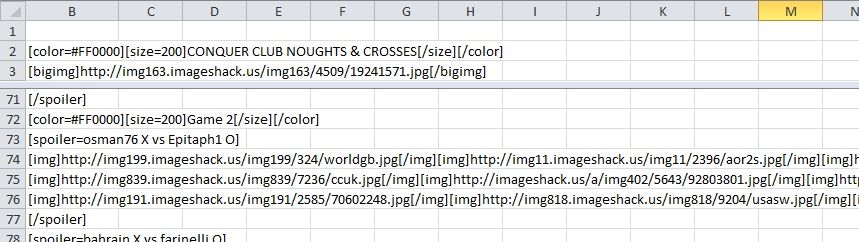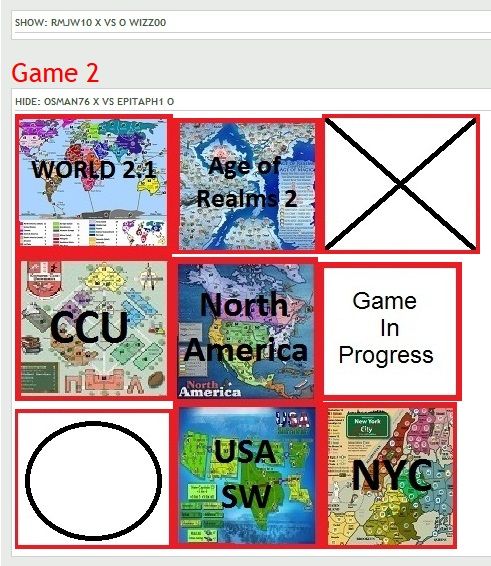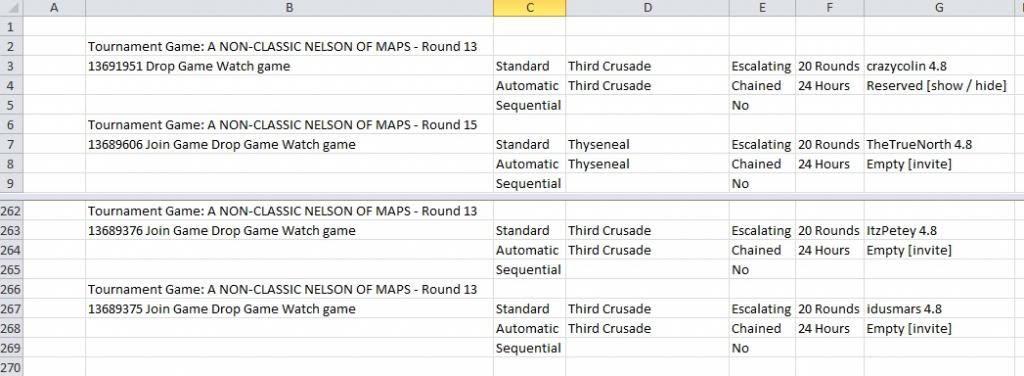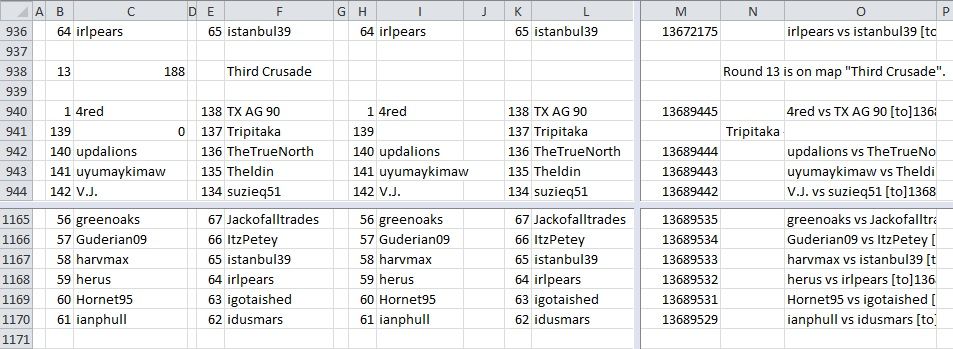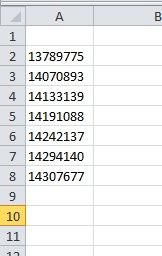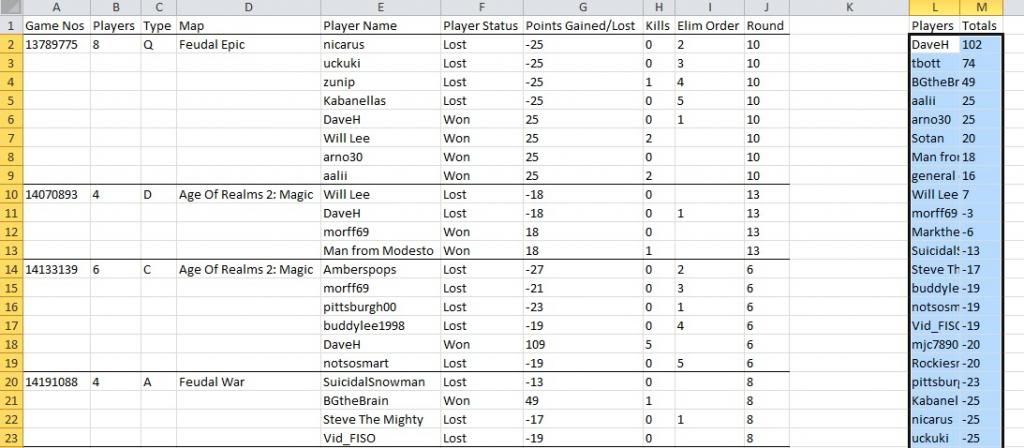
Spoiler

getting started
OK, so you had an idea for your first tournament; you looked at other tournaments; read up on the procedure and published your tournament thread. Shortly afterwards, eager medal hunters filled all the available spaces and you are up and running with tournament privileges. Now you begin to invite the players into the games and realise just how tedious this is – and sometimes difficult to keep track – and wish you had thought this bit through a bit better.
Then, as the games get under way and results start coming in, you keep the tournament thread up-to-date and you wished you had thought of a less complex tournament and wonder how best to manage the updates with a minimum of effort.
That was my experience anyway. So, this series is about different tournament types and techniques of managing them, and, since I am still learning, I’m sure that there are many others out there who have far better methods; if so let me know and I will publish them.
So, let’s start by recapping the steps you needed in beginning your first tournament:
Night Strike’s excellent “How to Host a Tournament” guide covers all the procedural stuff you need to begin:
http://www.conquerclub.com/forum/viewto ... 6#p2141686
Scroll down to the bottom for the “Organising Your Thread” and “Tournament Tools” for the tags and tools to make your tournament invitation thread attractive and organised. There is also a very good set of articles by rdsrds2120 called "The Forum Tips Thread" that gives additional information. http://www.conquerclub.com/forum/viewto ... 57&t=17807.
For instance:

The above was created using the following tools and tags:

Note that the image was uploaded to a free hosting site; Photobucket or, in this case, ImageShack. You don't have to have a picture, but you could include your banner or, as greenoaks' series of Watch and Learn or KISS, he has a special banner to identify the particular series. If you don't have an appropriate banner, then a copy of the map used in the tournament can always be inserted if required.
OK, so now you have a tournament thread that can be posted to attract players. As you get postings from players you can edit your thread to incude their names and update your title to indicate the number of players already included: "My Fantastic First Tournament (5 of 16)". Then post a thread to say that you have included "up to here" - communication to your players is always good practice!
When you have your full complement of players and perhaps one or two additional reserves, you change the title to "My Fantastic First Tournament (Full)" and magically, it seems, within a day or two you have a pm giving you tournament rights and allowing you to create your games.
Let's say you invite your players rather than send pm's (I'll write about a few short cuts for pm'ing in a future article) and you decide to keep track of your games using Challonge (challonge.com). This is a useful (free!) site that allows you to select the type of tournament; say a single elimination, then you copy in your list of players; you can even randomise them using Challonge. There is a link adress on the site that you can paste into your tournament thread that gives a picture of the tournament progress. The following is from one of my completed tournaments.
 Remember that you still need to occasionally post progress notes onto your tournament thread, as updating Challonge does not affect the thread directly.
So - there is your first tournament set up and under way - it is so easy there is no reason why you should not start right away!
Then, as the games get under way and results start coming in, you keep the tournament thread up-to-date and you wished you had thought of a less complex tournament and wonder how best to manage the updates with a minimum of effort.
That was my experience anyway. So, this series is about different tournament types and techniques of managing them, and, since I am still learning, I’m sure that there are many others out there who have far better methods; if so let me know and I will publish them.
So, let’s start by recapping the steps you needed in beginning your first tournament:
Night Strike’s excellent “How to Host a Tournament” guide covers all the procedural stuff you need to begin:
http://www.conquerclub.com/forum/viewto ... 6#p2141686
Scroll down to the bottom for the “Organising Your Thread” and “Tournament Tools” for the tags and tools to make your tournament invitation thread attractive and organised. There is also a very good set of articles by rdsrds2120 called "The Forum Tips Thread" that gives additional information. http://www.conquerclub.com/forum/viewto ... 57&t=17807.
For instance:
The above was created using the following tools and tags:
Note that the image was uploaded to a free hosting site; Photobucket or, in this case, ImageShack. You don't have to have a picture, but you could include your banner or, as greenoaks' series of Watch and Learn or KISS, he has a special banner to identify the particular series. If you don't have an appropriate banner, then a copy of the map used in the tournament can always be inserted if required.
OK, so now you have a tournament thread that can be posted to attract players. As you get postings from players you can edit your thread to incude their names and update your title to indicate the number of players already included: "My Fantastic First Tournament (5 of 16)". Then post a thread to say that you have included "up to here" - communication to your players is always good practice!
When you have your full complement of players and perhaps one or two additional reserves, you change the title to "My Fantastic First Tournament (Full)" and magically, it seems, within a day or two you have a pm giving you tournament rights and allowing you to create your games.
Let's say you invite your players rather than send pm's (I'll write about a few short cuts for pm'ing in a future article) and you decide to keep track of your games using Challonge (challonge.com). This is a useful (free!) site that allows you to select the type of tournament; say a single elimination, then you copy in your list of players; you can even randomise them using Challonge. There is a link adress on the site that you can paste into your tournament thread that gives a picture of the tournament progress. The following is from one of my completed tournaments.
Remember that you still need to occasionally post progress notes onto your tournament thread, as updating Challonge does not affect the thread directly.So - there is your first tournament set up and under way - it is so easy there is no reason why you should not start right away!
randomising your player list
Once your tournament is full; you have tournament rights and you have created the blank games, you need to assign players to each game.
In many cases you first need to randomise your player list and there are several ways of doing this. If you are showing the results using Challonge then you can shuffle your list and then assign the list to be paired either sequentially (1 v 2, 3 v 4 etc) or traditionally (1 v 16, 2 v 15 etc as though they were seeded in order).
If you are not using Challonge, you could shuffle your player list by copying them to Random.org (http://www.random.org/lists/) and pasting the results back into an Excel spreadsheet. However you then find that each randomised name is preceded by numbers. An easy way of getting rid of these is by use of the following Excel function:

Column B has the player list (as entered); Column C is the randomised list from Random.org and the function copied into Column D is used to strip out the numbers.
The formula in D3 is:- For those of you wanting to know how the formula works, the RIGHT(C3,N) function copies the rightmost "N" characters from the text in cell C3. The LEN(C3) function gives the number of characters in the text in cell C3. The FIND(" ",C3) function finds the position of the space in cell C3. Therefore the formula copies the rightmost characters from the position of the space. Remember that if you then copy from this formula column you have to Paste Special/Value otherwise you get the function copied!
Greenoaks, master tournament organiser of over 100 tournaments (including his KISS, Watch & Learn and Best at Beta series) reminded me that you can also use random.org for randomising the game settings - and that gave me the idea for the "Random, Random, Random" tournament I started recently (though I am sure that the idea is not at all original!).
Another method of randomising your player list is to have your player list in Excel and paste the Random function RAND()in the next column. This function puts a random number between 0 and 1 into the column. You then select the two rows and sort according to the random number;

You find that each time you sort or refresh, the random number changes.
Note that if you are planning to set up an Excel template for many tournaments (and you are rather lazy!) you can create a macro to do the pasting and sorting. Simply select Tools/Macro/Record New Macro... and then give your macro a name and perhaps assign a key. Then just go though the row select and sort process and end your macro - done! If you want to put a button on your spreadsheet that carries out this new sort macro then select Tools/Customise/Format then drag the button icon to your toolbar. Then by selecting this icon then drawing a rectangle on your spreadsheet a button appears and you go straight to a window that allows you to assign your macro to this button. Job done! However, remember not to run this macro after you have started your tournament!
(These "tips" are ones that I have tried to make it a bit easier in managing my own tournaments. I am sure there are different and better methods than these, so please let me know. Any queries on the above I'll be glad to respond to!)
In many cases you first need to randomise your player list and there are several ways of doing this. If you are showing the results using Challonge then you can shuffle your list and then assign the list to be paired either sequentially (1 v 2, 3 v 4 etc) or traditionally (1 v 16, 2 v 15 etc as though they were seeded in order).
If you are not using Challonge, you could shuffle your player list by copying them to Random.org (http://www.random.org/lists/) and pasting the results back into an Excel spreadsheet. However you then find that each randomised name is preceded by numbers. An easy way of getting rid of these is by use of the following Excel function:
Column B has the player list (as entered); Column C is the randomised list from Random.org and the function copied into Column D is used to strip out the numbers.
The formula in D3 is:-
Code: Select all
=RIGHT(C3,LEN(C3)-FIND(" ",C3))Greenoaks, master tournament organiser of over 100 tournaments (including his KISS, Watch & Learn and Best at Beta series) reminded me that you can also use random.org for randomising the game settings - and that gave me the idea for the "Random, Random, Random" tournament I started recently (though I am sure that the idea is not at all original!).
Another method of randomising your player list is to have your player list in Excel and paste the Random function RAND()in the next column. This function puts a random number between 0 and 1 into the column. You then select the two rows and sort according to the random number;
You find that each time you sort or refresh, the random number changes.
Note that if you are planning to set up an Excel template for many tournaments (and you are rather lazy!) you can create a macro to do the pasting and sorting. Simply select Tools/Macro/Record New Macro... and then give your macro a name and perhaps assign a key. Then just go though the row select and sort process and end your macro - done! If you want to put a button on your spreadsheet that carries out this new sort macro then select Tools/Customise/Format then drag the button icon to your toolbar. Then by selecting this icon then drawing a rectangle on your spreadsheet a button appears and you go straight to a window that allows you to assign your macro to this button. Job done! However, remember not to run this macro after you have started your tournament!
(These "tips" are ones that I have tried to make it a bit easier in managing my own tournaments. I am sure there are different and better methods than these, so please let me know. Any queries on the above I'll be glad to respond to!)
Inviting Your Players
Once your tournament is full; you have tournament rights; you have created the blank games and randomised your player list. Now you need to invite players to join their games.
If there is one game per round, you can invite them easily enough, but it is less work for you to send them a personal message and let them join the games themselves. With several games per player, the pm saves a lot of additional work. For instance if you have 16 players, then you need 16 invitations or 8 pm's. If there are three games per pairing, then you either need to make 48 invitations or just 8 pm's.
To keep it simple, let's firstly compose a pm for 1 game that allows players to join their game.

Column B is the randomised player list and column C the RAND(0) function which was used to randomise the player list (and has changed its values once again!). The password (don't forget the password - as I did recently!) is in D2.
Into column D are copied the game numbers - a tip here is that when you create the games you end up with numbers that are mostly in sequence. You can therefore copy the largest game number into the first game - say that is cell D4. You can then put formulae into the other cells that refer to cell D4 minus 1 (or 2 etc if the numbers are not quite sequential) and so on.
The code in column E is:This creates the code for a game invitation which can be copied into a pm sent (by BCC perhaps) to Player4 and Player2;
View Game 1234567 (Auto-Join Game)
You can aso add a greeting message in your spreadsheet. "Welcome to my Fantastic First Tournament! We can now get under way and your first round game is as follows. Good Luck! ". Let's say you write this into cell G3 and change the code to:Note that the
If there is one game per round, you can invite them easily enough, but it is less work for you to send them a personal message and let them join the games themselves. With several games per player, the pm saves a lot of additional work. For instance if you have 16 players, then you need 16 invitations or 8 pm's. If there are three games per pairing, then you either need to make 48 invitations or just 8 pm's.
To keep it simple, let's firstly compose a pm for 1 game that allows players to join their game.
Column B is the randomised player list and column C the RAND(0) function which was used to randomise the player list (and has changed its values once again!). The password (don't forget the password - as I did recently!) is in D2.
Into column D are copied the game numbers - a tip here is that when you create the games you end up with numbers that are mostly in sequence. You can therefore copy the largest game number into the first game - say that is cell D4. You can then put formulae into the other cells that refer to cell D4 minus 1 (or 2 etc if the numbers are not quite sequential) and so on.
The code in column E is:
Code: Select all
="[to]"&D4&" "&$D$2&"[/to]"View Game 1234567 (Auto-Join Game)
You can aso add a greeting message in your spreadsheet. "Welcome to my Fantastic First Tournament! We can now get under way and your first round game is as follows. Good Luck! ". Let's say you write this into cell G3 and change the code to:
Code: Select all
=G$3&"[list][to]"&D4&" "&$D$2&"[/to][/list]"- tag puts the game information on the next line (which looks a bit better!).
This then creates the following message and game information:
Welcome to my Fantastic First Tournament! We can now get under way and your first round game is as follows. Good Luck!
View Game 1234567 (Auto-Join Game)
OK - so now we can expand that for, say, three games:The code is three concatenated formulae (i.e. 3 x single invites as above):- Click image to enlarge.

Note that you can cut and paste these as required, but remember that they only relate to the column and row numbers that I have specified in my examples, so you need to change them to suit your layout.Code: Select all
="[to]"&D4&" "&$D$2&"[/to]"&"; "&"[to]"&E4&" "&$D$2&"[/to]"&"; "&"[to]"&F4&" "&$D$2&"[/to]"
OK, so this code translates into 3 game invites that can be copied into the player's pm;
View Game 1234567 (Auto-Join Game); View Game 1234566 (Auto-Join Game); View Game 1234565 (Auto-Join Game)
As before, you can add a greeting. Also, to tidy up the formatting, you can add the- tag;
This process is slightly different when you have team entries, but the basic process is the same.
Code: Select all
="[list][to]"&D4&" "&$D$2&"[/to][/list][list][to]"&E4&" "&$D$2&"[/to][/list][list][to]"&F4&" "&$D$2&"[/to][/list]"
Now the invites are out, you just need to sit back - apart from checking that the players have all joined and, of course, keeping up with result reporting.....
(These "tips" are ones that I have tried to make it a bit easier in managing my own tournaments. I am sure there are different and better methods than these, so please let me know. Any queries on the above I'll be glad to respond to!)
updating your tournament thread
Your tournament is up and running. Now you need to occasionally check on progress and update the results when games have finished.
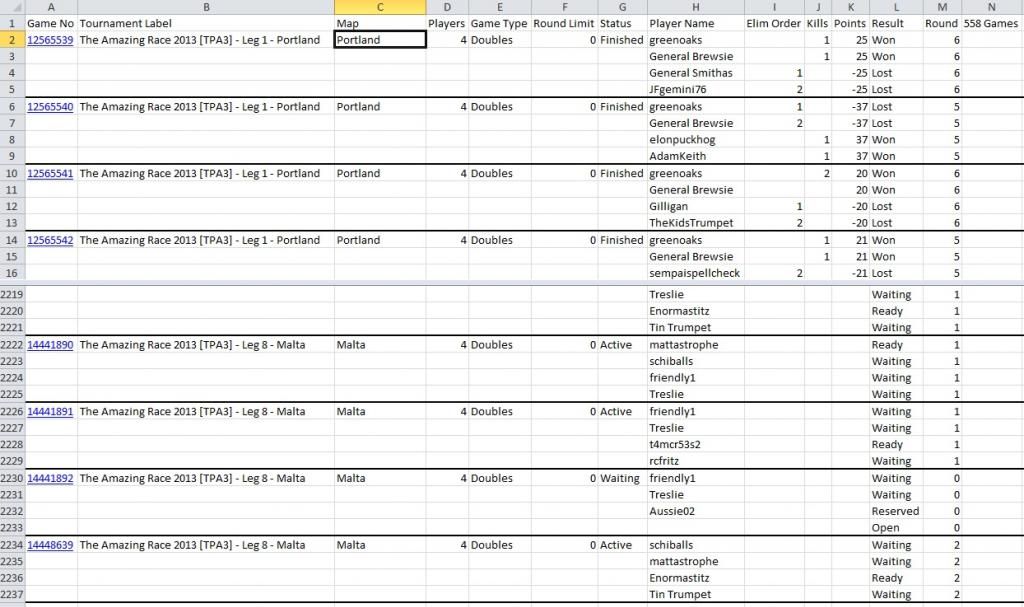
To keep track of the games, the "Tour Stats" button on the game finder gives a summary of the state of progress of your tournament/s. If one or two games are taking a bit longer to finish and you want to send out the next round games as soon as possible after these games have finished, you can also install and use the Turn Watch greasemonkey script which adds a tab listing all the games you have clicked to watch.
When games have finished and you want to update your tournament thread, a simple process I use is a spreadsheet with functions to simplify the copy for your thread. Consider a simple 1 vs 1 knock-out:Columns B and C are the lists of competing players and column D the game number (yes, I know that in my last spreadsheet about inviting players by pms, the players were all in one column, but the following example is to keep the coding as simple as possible). The next column is blank until the game is finished, then the winning player's name is copied in. The code in column E is: For those of you who want to understand the Excel functions, after the text to insert the game number there is a conditional statement; if the winner cell is blank, then put in the two players' names , else if the winner text is PlayerA, include the "s" tag for PlayerB, otherwise include the "s" tag for Player A. The "s" tag puts lines through the loser's name.
When the text in column E is copied to your tournament thread in the appropriate place, you get the following:
Game 1234567 Player4 vs Player2
Game 1234566 Player5 vs Player1
Game 1234565 Player3 vs Player7
Note that the above coding does not take into account the winning player being mistyped into the column. However, you can amend the code to take care of this eventuality:Game 1234567 Player4 vs Player2
Game 1234566 Player5 vs Player1
Game 1234565 Player3 vs Player7
Game 1234564 Typing Error!
Of course, there are many variations of this format that you may want to use. If you have several players, then the coding to put lines through the losers can get quite tricky, so I have used the following for a 4-player Assassin tournament:This simply adds the name of the winner after the game number and list of players.
The coding for this is:Again, you just copy the column and paste into your tournament thread.
Game 1234567 Player1, Player2, Player3, Player4.
Game 1234566 Player5, Player6, Player7, Player8; won by Player5
And there you are; "proper job" as they say here in Devon! Merry Christmas To You All!
(These "tips" are ones that I have tried to make it a bit easier in managing my own tournaments. I am sure there are different and better methods than these, so please let me know. Any queries on the above I'll be glad to respond to!)
To keep track of the games, the "Tour Stats" button on the game finder gives a summary of the state of progress of your tournament/s. If one or two games are taking a bit longer to finish and you want to send out the next round games as soon as possible after these games have finished, you can also install and use the Turn Watch greasemonkey script which adds a tab listing all the games you have clicked to watch.
When games have finished and you want to update your tournament thread, a simple process I use is a spreadsheet with functions to simplify the copy for your thread. Consider a simple 1 vs 1 knock-out:
- Click image to enlarge.

Code: Select all
="[game]"&D3&"[/game] "&IF(E3="",B3&" vs "&C3,IF(E3=B3,B3&" vs [s]"&C3&"[/s]","[s]"&B3&"[/s] vs "&C3))When the text in column E is copied to your tournament thread in the appropriate place, you get the following:
Game 1234567 Player4 vs Player2
Game 1234566 Player5 vs Player1
Game 1234565 Player3 vs Player7
Note that the above coding does not take into account the winning player being mistyped into the column. However, you can amend the code to take care of this eventuality:
- Click image to enlarge.

Code: Select all
="[game]"&D3&"[/game] "&IF(E3="",B3&" vs "&C3,IF(E3=B3,B3&" vs [s]"&C3&"[/s]",IF(E3=C3,"[s]"&B3&"[/s] vs "&C3,"Typing Error!")))Game 1234566 Player5 vs Player1
Game 1234565 Player3 vs Player7
Game 1234564 Typing Error!
Of course, there are many variations of this format that you may want to use. If you have several players, then the coding to put lines through the losers can get quite tricky, so I have used the following for a 4-player Assassin tournament:
- Click image to enlarge.

The coding for this is:
Code: Select all
="[game]"&F3&"[/game] "&B3&", "&C3&", "&D3&", "&E3&(IF(G3="",".","; won by "&G3))Game 1234567 Player1, Player2, Player3, Player4.
Game 1234566 Player5, Player6, Player7, Player8; won by Player5
And there you are; "proper job" as they say here in Devon! Merry Christmas To You All!
(These "tips" are ones that I have tried to make it a bit easier in managing my own tournaments. I am sure there are different and better methods than these, so please let me know. Any queries on the above I'll be glad to respond to!)
updating your results
I'm quite lazy. Once I have updated my tournament results in Excel I like to be able to copy a block of text into the tournament thread to update the winners without needing additional typing. Therefore I use functions and macros where possible. Macros are accessed in Excel from the Tools/Macro menu. The best way I find of creating a new one is to go to Tools/Macro/Record New Macro; then enter the macro name (and perhaps a key press) that you want to use and then click the "stop" logo on the small window that appears. Then go to Tools/Macro/Macros, highlight your macro and choose "Edit" to open your macro into a new window so that you can edit and test your macro before saving the final version.
Obviously there are many different types of tournaments and ways of scoring, so I'll give an example from one of my present tournaments. In this one, a 4-player assassin tournament, I am recording the winner's name for each game and therefore need a macro that adds up the number of wins by each player.

The winners' names are in a list and I use the following macro to scan down the list and copy the winners names into a separate list.
We now have a list of all the winners with 1's in the next column. Obviously there may be players who have won more than one game, so we sort them alphabetically:
We now scan down our list and, if there are two names the same, we add together the number of wins and delete one of the results. We then have to repeat the sort and check for duplicates until we have no further duplicates:
The final act is to sort by the total number of wins:
The resulting block of names and number of games won can then be copied and pasted to your tournament thread.
The macro can then be accessed by assigning a keypress or using a button on the spreadsheet.
(These "tips" are ones that I have tried to make it a bit easier in managing my own tournaments. I am sure there are different and better methods than these, so please let me know. Any queries on the above I'll be glad to respond to!)
Obviously there are many different types of tournaments and ways of scoring, so I'll give an example from one of my present tournaments. In this one, a 4-player assassin tournament, I am recording the winner's name for each game and therefore need a macro that adds up the number of wins by each player.
The winners' names are in a list and I use the following macro to scan down the list and copy the winners names into a separate list.
Code: Select all
Dim i, j, itotal As Integer 'integers used in this macro
Dim Aname, Bname As String 'string fields used to hold the players' names
itotal = 0 'itotal is the number of winners
For i = 47 To 112 'start to last row number of the winners' list
    Aname = Cells(i, 25).Value '25 is the player list's column number
    If Aname <> "" Then 'not blank - so a player's name
        itotal = itotal + 1 ' increment the number of winners
        Cells(itotal + 46, 29).Value = Aname 'put the player's name in column 29
        Cells(itotal + 46, 30).Value = 1 'put 1 (for 1 win) in the next column
    End If
We now have a list of all the winners with 1's in the next column. Obviously there may be players who have won more than one game, so we sort them alphabetically:
Code: Select all
Range(Cells(47, 29), Cells(46 + itotal, 30)).Select
Selection.Sort Key1:=Range("AC47"), Order1:=xlAscending
We now scan down our list and, if there are two names the same, we add together the number of wins and delete one of the results. We then have to repeat the sort and check for duplicates until we have no further duplicates:
Code: Select all
j = 1 'j used as a "duplicate" flag
While j > 0 'repeat this sequence while j>0 (duplicates found)
    j = 0 ' no duplicates yet
    For i = 1 To itotal - 1
        Aname = Cells(i + 46, 29) 'first name in list
        Bname = Cells(i + 47, 29) 'second name in list
        If Aname = Bname Then 'the player has more than 1 win
            j = j + 1 'so j increased to flag that a duplicate has been found
            Cells(i + 46, 30) = Cells(i + 46, 30) + Cells(i + 47, 30) 'add the number of wins together
            Cells(i + 47, 29) = "" 'delete the duplicate name
            Cells(i + 47, 30) = "" 'delete the second number
            itotal = itotal - 1 ' 1 fewer names in winner's list
        End If
    Next i
    Range(Cells(47, 29), Cells(46 + itotal + j, 30)).Select 're-sort our list
    Selection.Sort Key1:=Range("AC47"), Order1:=xlAscending
Wend
The final act is to sort by the total number of wins:
Code: Select all
Range(Cells(47, 29), Cells(46 + itotal, 30)).Select
Selection.Sort Key1:=Range("AD47"), Order1:=xlDescending
The resulting block of names and number of games won can then be copied and pasted to your tournament thread.
The macro can then be accessed by assigning a keypress or using a button on the spreadsheet.
(These "tips" are ones that I have tried to make it a bit easier in managing my own tournaments. I am sure there are different and better methods than these, so please let me know. Any queries on the above I'll be glad to respond to!)
Round Robin Scoring
Sensfan is covering Round Robin type tournaments in this edition, where everyone plays each other, perhaps just one game on a neutral map or two games on a home and away map, with points allocated as required. This article adds a few hints at managing these types of tournaments.
The simplest way is to use Challonge or Leaguerepublic sites to do the hard work for you - just update the game results on the sites and the results table is updated automatically - with a handy link that you put in your tournament thread. One hint if you use these sites is that, when you update the results also update your thread in some other way, say round number. Otherwise after a number of rounds, it may be flagged up as an abandoned tournament!
Alternatively, you may want to publish the league table using your own spreadsheet. Refering to the league table that is in Sensfan's article: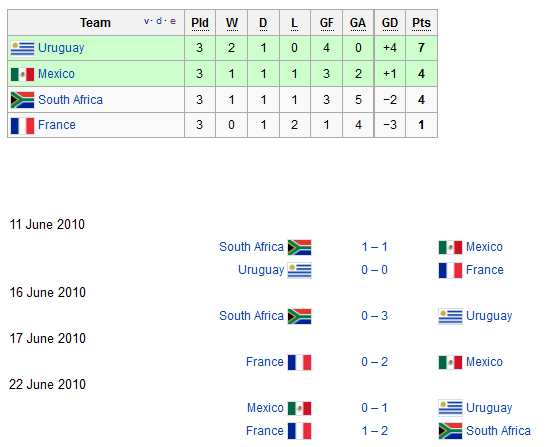
This has a list of players and their number of wins and draws. Of course, we can't draw a game in CC, so let's assume that only one game is played on a neutral map.
The points column of your spreadsheet therefore has the code of "= pointsperwin x number of wins".
If two games are played, one on a home map and the other on the away map, then there is a point for a home or away win plus a bonus point for winning both. The points are therefore 0 for two losses; 1 point for each player for winning one game each and 3 points for winning on both maps. The code for your spreadsheet for the points is therefore: which gives 1 point for a 1-1 draw and 3 points for a 2-0 result.
Of course, as Sensfan says, the possibilities are endless - limited only by the scope of your imagination! They can get as realistic as you want (depending on how much work you want to put into your tournament!); for instance flexmaster33's "Major League Soccer 2011" http://www.conquerclub.com/forum/viewto ... =139081has teams of 3:
(deleted image)
The forward player plays 3 games against the opponents back player and the midfield players play 4 games. The team then plays 1 game to determine the goalie's point! Of course there are home and away maps apart from the team game. Fantastic!
Other Round Robin formats may have points awarded according to other factors. For instance, in terminator games such as trinicardinal's "Trini's Terminator Tournament (TTT)" tournament, the points are recorded according to the termination sequence: http://www.conquerclub.com/forum/viewtopic.php?t=157017.
But there are so many variations on awarding points that you can be as creative as you like! I have tried awarding points equal to 15 minus the round number (so as to to award fast finishes!) and also the CC points that a player gained when winning. All in all, the points are whatever your imagination can come up with - and the game format can be as simple or as complex as you like - proving that you already have planned how you are going to update it - otherwise it can be become quite a burdon to update.
(These "tips" are ones that I have tried to make it a bit easier in managing my own tournaments. I am sure there are many different and better methods than these, so please let me know. Any queries on the above I'll be glad to respond to!)
The simplest way is to use Challonge or Leaguerepublic sites to do the hard work for you - just update the game results on the sites and the results table is updated automatically - with a handy link that you put in your tournament thread. One hint if you use these sites is that, when you update the results also update your thread in some other way, say round number. Otherwise after a number of rounds, it may be flagged up as an abandoned tournament!
Alternatively, you may want to publish the league table using your own spreadsheet. Refering to the league table that is in Sensfan's article:
This has a list of players and their number of wins and draws. Of course, we can't draw a game in CC, so let's assume that only one game is played on a neutral map.
The points column of your spreadsheet therefore has the code of "= pointsperwin x number of wins".
If two games are played, one on a home map and the other on the away map, then there is a point for a home or away win plus a bonus point for winning both. The points are therefore 0 for two losses; 1 point for each player for winning one game each and 3 points for winning on both maps. The code for your spreadsheet for the points is therefore:
Code: Select all
=1+IF(homewinner=awaywinner,1,0)Of course, as Sensfan says, the possibilities are endless - limited only by the scope of your imagination! They can get as realistic as you want (depending on how much work you want to put into your tournament!); for instance flexmaster33's "Major League Soccer 2011" http://www.conquerclub.com/forum/viewto ... =139081has teams of 3:
(deleted image)
The forward player plays 3 games against the opponents back player and the midfield players play 4 games. The team then plays 1 game to determine the goalie's point! Of course there are home and away maps apart from the team game. Fantastic!
Other Round Robin formats may have points awarded according to other factors. For instance, in terminator games such as trinicardinal's "Trini's Terminator Tournament (TTT)" tournament, the points are recorded according to the termination sequence: http://www.conquerclub.com/forum/viewtopic.php?t=157017.
But there are so many variations on awarding points that you can be as creative as you like! I have tried awarding points equal to 15 minus the round number (so as to to award fast finishes!) and also the CC points that a player gained when winning. All in all, the points are whatever your imagination can come up with - and the game format can be as simple or as complex as you like - proving that you already have planned how you are going to update it - otherwise it can be become quite a burdon to update.
(These "tips" are ones that I have tried to make it a bit easier in managing my own tournaments. I am sure there are many different and better methods than these, so please let me know. Any queries on the above I'll be glad to respond to!)
Single Elimination Games
In edition #62, Sensfan gave an overview of the easiest format of a tournament which is a 16 player single elimination tournament i.e.
Player A plays Player B in game 1 and the winner goes through to game 9, meeting the winner of game 2 between players C and D etc.
In this edition I will give you a few tips on making the management of such a tournament as easy as possible. Obviously you can use Challonge as previously mentioned, though you may want to have your own "tree" image which also gives the game numbers.
However, whereas the graphical "tree" format as above gives a very clear illustration of players progress through the tournament, it is not the easiest format to use in managing the various invites etc. For instance the following format is better to use:

Let's consider that you want to link both spreadsheets so that, by updating the table, the graphical representation is automatically updated.
Let's consider the table first. The players' names are copied (or automatically looked-up as I have explained previously) from your randomised player list into the table with the game numbers. When the winning player's name is copied in, then that can automatically be copied into their next game match-up. For instance if A wins game 1, then cell F4 holds his name and cell C12 needs to have that player's name for his game 9 match. Cell C12 can therefore have the text "=F4" in it to automatically insert the name. However, this will insert a "0" if there is no name in F4, so a better formula is "=IF(F4="","",F4)" which inserts a blank instead of "0".
OK so you can complete the table so that the games are all automatically inserted. Of course, you can also do the same for the graphical "tree"! Let's assume you have created this on sheet2 of your spreadsheet. You can then go through this spreadsheet and change the player references to link to the table in sheet1. For instance cell B4 on sheet2 contains "=sheet1!C4" and so on for the players and then the winners. Now you can put in the games numbers - for instance cell B5 on sheet1 contains ="Game "&Sheet1!E4. And so on. Yes it's quite a bit of work, but if you are wanting to run a series of games using the same format, it will be well worth it!
If you want to know how to copy your graphical tree into your tournament thread then you simply take a picture of the tree by pressing your PrtSch (print screen) button; open "Paint" or another similar programme and paste the image into it. You can move the image so that the top left corner is positioned correctly and you need to save it as a ".jpg" image. To crop off the right and bottom irrelevant parts of the image, I use Microsoft Office Picture Manager and then upload it to ImageShack or other free image repository site. (I am sure there must be an easier way, though, if anyone wants to let me know it!)
I have created a template that can be used for single elimination tournaments that can be viewed at the following address:
https://docs.google.com/spreadsheet/ccc ... n_GB#gid=0
It has 3 sheets; the first to insert the players' names and then sort into a random order; the second is the spreadsheet tracking progress, with invites and progress lists to make it easier to update the tournament thread; the third is the above "tree" that can be used if you want a graphical representation of the progress. Note that these documents do not display exactly as in Excel, so you need to look at each cell to see its entire contents, should they be m,asked by the next column.
(These "tips" are ones that I have tried to make it a bit easier in managing my own tournaments. I am sure there are many different and better methods than these, so please let me know. Any queries on the above I'll be glad to respond to!)
- Click image to enlarge.

In this edition I will give you a few tips on making the management of such a tournament as easy as possible. Obviously you can use Challonge as previously mentioned, though you may want to have your own "tree" image which also gives the game numbers.
However, whereas the graphical "tree" format as above gives a very clear illustration of players progress through the tournament, it is not the easiest format to use in managing the various invites etc. For instance the following format is better to use:
Let's consider that you want to link both spreadsheets so that, by updating the table, the graphical representation is automatically updated.
Let's consider the table first. The players' names are copied (or automatically looked-up as I have explained previously) from your randomised player list into the table with the game numbers. When the winning player's name is copied in, then that can automatically be copied into their next game match-up. For instance if A wins game 1, then cell F4 holds his name and cell C12 needs to have that player's name for his game 9 match. Cell C12 can therefore have the text "=F4" in it to automatically insert the name. However, this will insert a "0" if there is no name in F4, so a better formula is "=IF(F4="","",F4)" which inserts a blank instead of "0".
OK so you can complete the table so that the games are all automatically inserted. Of course, you can also do the same for the graphical "tree"! Let's assume you have created this on sheet2 of your spreadsheet. You can then go through this spreadsheet and change the player references to link to the table in sheet1. For instance cell B4 on sheet2 contains "=sheet1!C4" and so on for the players and then the winners. Now you can put in the games numbers - for instance cell B5 on sheet1 contains ="Game "&Sheet1!E4. And so on. Yes it's quite a bit of work, but if you are wanting to run a series of games using the same format, it will be well worth it!
If you want to know how to copy your graphical tree into your tournament thread then you simply take a picture of the tree by pressing your PrtSch (print screen) button; open "Paint" or another similar programme and paste the image into it. You can move the image so that the top left corner is positioned correctly and you need to save it as a ".jpg" image. To crop off the right and bottom irrelevant parts of the image, I use Microsoft Office Picture Manager and then upload it to ImageShack or other free image repository site. (I am sure there must be an easier way, though, if anyone wants to let me know it!)
I have created a template that can be used for single elimination tournaments that can be viewed at the following address:
https://docs.google.com/spreadsheet/ccc ... n_GB#gid=0
It has 3 sheets; the first to insert the players' names and then sort into a random order; the second is the spreadsheet tracking progress, with invites and progress lists to make it easier to update the tournament thread; the third is the above "tree" that can be used if you want a graphical representation of the progress. Note that these documents do not display exactly as in Excel, so you need to look at each cell to see its entire contents, should they be m,asked by the next column.
(These "tips" are ones that I have tried to make it a bit easier in managing my own tournaments. I am sure there are many different and better methods than these, so please let me know. Any queries on the above I'll be glad to respond to!)
Double Eliminations Tournaments
If you scan through the list of available tournaments, you will find all kinds of inventive game formats. There are the straight elimination tournaments, with 1, 3 or 5 games to find the winner. Obviously the more the number of games played per round, the less the opportunity for lucky deployments and dice to play a part in the result.
In the last editions Sensfan and I looked at single eliminations and round-robin tournaments. In this I look at double elimination tournaments and I'll be giving you a few hints on managing them.
The easiest way of creating a double elimination style tournament is to double the number of entrants; for instance, in a 16 player tournament you enter each opponent twice as though you had 32 players. Once you randomise your player list and assign them to games there is, of course, the possibility that a player will be playing himself, so you need to say that in this circumstance he will go through automatically to the next round - losing one of his "lives"!
You can also have a double elimination tournament which is made easier by using Challonge.com. If you lose one match you then have a second chance of winning. Dazza, though, in one of his tournament series, has made it even more interesting by entering each player twice, so there are 4 chances of winning - hence his "double-double" series title!Of course you can always enter each player "n" times into a single elimination type format game (as in deantursx's 1v1 Random Multi-Entry tournament with 4 entries per player). However the advantage with the double or triple elimination format used in Challonge is that, once eliminated, you rejoin at an appropriate position in the tournament rather than at the start.
You don't have to use Challonge though. You can create your own double elimination tournament and manage it using Excel. For instance:

The "tree" is the same as in a single elimination tree, where Player1 plays Player2 in Game A etc. However, there is a "second chance" option which is as follows:

In this, the losers of games F and E battle it out to play against the loser of game I; and so on.
And, of course, there are various related options that you can try. Butters1919, for instance, has used his own results table in his series of triple knock-out tournaments:Doesn't it look lovely! Note the way he used colour coding for the number of lives lost. (As the runner-up from this particular tournament, the downside to this format is that Leintz and I seemed to be playing each other an inordinate number of times!)
Sometime, we'll have to find out how he produced the image and any hints on how he managed it.
(These "tips" are ones that I have tried to make it a bit easier in managing my own tournaments. I am sure there are many different and better methods than these, so please let me know. Any queries on the above I'll be glad to respond to!)
In the last editions Sensfan and I looked at single eliminations and round-robin tournaments. In this I look at double elimination tournaments and I'll be giving you a few hints on managing them.
The easiest way of creating a double elimination style tournament is to double the number of entrants; for instance, in a 16 player tournament you enter each opponent twice as though you had 32 players. Once you randomise your player list and assign them to games there is, of course, the possibility that a player will be playing himself, so you need to say that in this circumstance he will go through automatically to the next round - losing one of his "lives"!
You can also have a double elimination tournament which is made easier by using Challonge.com. If you lose one match you then have a second chance of winning. Dazza, though, in one of his tournament series, has made it even more interesting by entering each player twice, so there are 4 chances of winning - hence his "double-double" series title!
- Click image to enlarge.

You don't have to use Challonge though. You can create your own double elimination tournament and manage it using Excel. For instance:
The "tree" is the same as in a single elimination tree, where Player1 plays Player2 in Game A etc. However, there is a "second chance" option which is as follows:
In this, the losers of games F and E battle it out to play against the loser of game I; and so on.
And, of course, there are various related options that you can try. Butters1919, for instance, has used his own results table in his series of triple knock-out tournaments:
- Click image to enlarge.

Sometime, we'll have to find out how he produced the image and any hints on how he managed it.
(These "tips" are ones that I have tried to make it a bit easier in managing my own tournaments. I am sure there are many different and better methods than these, so please let me know. Any queries on the above I'll be glad to respond to!)
Double, Triple and Quad Elimination Game Design
In the last newsletter, we covered double elimination tournaments and I mentioned the splendid triple elimination tournaments that Butters1919 runs. Well, he has kindly pointed me in the direction of information relating to the scientific design behind such tournaments. Whereas such tournament design may have originated for spectating tournaments, nevertheless many of the principles remain valid for CC.
* There are the obvious ones! In any multiple-elimination set-up, it must not be beneficial to lose a game in order to progress more easily via the loser stream! i.e. are there fewer games via the loser match-up stream?
* You want your tournament to flow so as to avoid any problem where the single player who comes out of the top (winner's) bracket does not play until a single opponent comes out of the bottom (loser's) bracket or brackets. i.e. to try to ensure that no player sits idle for more than one round.
* You want to try and avoid immediate replays and hope to limit how often two players meet up, although in the final stages this may be unavoidable.
* To meet the above, you may have players with different numbers of losses playing each other - and the possibility that a planned game includes a player who might have exceeded the allowed number of tournament losses! To get around this, there will be "if necessary" match-ups.
* You also may want to design multiple elimination tournaments to maintain ranked position match-ups so that the higher ranked players do not meet up until the final rounds.
Well, all these points are easier to consider looking at different types of tournaments that take these issues into consideration - and explain why they may look a bit strange at first! With thanks to Joe Czapski at tournamentdesign.org for his hard work on these and all the other designs available on his website and Butters1919 for his advice!
Let's start with a 4-player double elimination tournament in which the players are ranked from 1 to 4:

Game 7 is only necessary if the winner from Game 4 loses in game 6, so has a second chance, as did his opponent. You might want to have this format of game for 4 groups of 4 individuals - the winners going through to a fifth "tree" and gaining a two more elimination "lives"! In this case you would divide the rankings between the 4 initial "trees" so that, in theory, the 4 highest ranked players have the opportunity to get through to the final. (I might even try this one in my next tournament!)
For an example of a triple elimination tournament, many of you will already be familiar with Butters1919 series of tournaments; this is one of his latest ones:Note how colour coding is used to clarify the number of eliminations.
An example of a 4-player quad elimination game:Get's complex, doesn't it! However, you will see how the layout is designed to try and meet the above set of criteria. Anyone want to design a 16 player quad-elimination tournament??
(These "tips" are ones that I have tried to make it a bit easier in managing my own tournaments. I am sure there are many different and better methods than these, so please let me know. Any queries on the above I'll be glad to respond to!)
* There are the obvious ones! In any multiple-elimination set-up, it must not be beneficial to lose a game in order to progress more easily via the loser stream! i.e. are there fewer games via the loser match-up stream?
* You want your tournament to flow so as to avoid any problem where the single player who comes out of the top (winner's) bracket does not play until a single opponent comes out of the bottom (loser's) bracket or brackets. i.e. to try to ensure that no player sits idle for more than one round.
* You want to try and avoid immediate replays and hope to limit how often two players meet up, although in the final stages this may be unavoidable.
* To meet the above, you may have players with different numbers of losses playing each other - and the possibility that a planned game includes a player who might have exceeded the allowed number of tournament losses! To get around this, there will be "if necessary" match-ups.
* You also may want to design multiple elimination tournaments to maintain ranked position match-ups so that the higher ranked players do not meet up until the final rounds.
Well, all these points are easier to consider looking at different types of tournaments that take these issues into consideration - and explain why they may look a bit strange at first! With thanks to Joe Czapski at tournamentdesign.org for his hard work on these and all the other designs available on his website and Butters1919 for his advice!
Let's start with a 4-player double elimination tournament in which the players are ranked from 1 to 4:
Game 7 is only necessary if the winner from Game 4 loses in game 6, so has a second chance, as did his opponent. You might want to have this format of game for 4 groups of 4 individuals - the winners going through to a fifth "tree" and gaining a two more elimination "lives"! In this case you would divide the rankings between the 4 initial "trees" so that, in theory, the 4 highest ranked players have the opportunity to get through to the final. (I might even try this one in my next tournament!)
For an example of a triple elimination tournament, many of you will already be familiar with Butters1919 series of tournaments; this is one of his latest ones:
- Click image to enlarge.

An example of a 4-player quad elimination game:
- Click image to enlarge.

(These "tips" are ones that I have tried to make it a bit easier in managing my own tournaments. I am sure there are many different and better methods than these, so please let me know. Any queries on the above I'll be glad to respond to!)
Excel Macro to Summarise Points
This issue I'll set up an Excel macro to assign individual points to a "league" table. For simplicity, I'll start off as though the list of individual game winners are in a column on an Excel spreadsheet with the resulting points gained in the next column.

I have assumed that the tournament has 16 games of which 10 have been completed. There is a "Sort By Points" button on the spreadsheet which accesses the macro to summarise the points into the table in columns E and F.
The first few lines in the macro are to specify a few variables:-
The first thing to do is to copy all the players names and their totals into the final table:-
The list is copied into the results table:-

This can then be sorted by player name as there may be players with more than one entry/win:-

The last process is to scan down the table and, if a duplicate player's name exists, add on the second score to the first and delete the second entry. Then sort to get rid of the blanks and repeat this process until there are no duplicate names:-
When this routine is completed you have just one entry per winning player with their total points score. All you need to do now is to sort by totals and finish the subroutine:-
And there you have it; a table that can be copied and pasted straight into your tournament thread to give the latest running order!
OK, so to put this macro into your spreadsheet you need to do the following in your spreadsheet:-
Yes, it's a tedious process at first when you don't know your way around Excel and macros, but, once done, you can then customise your macro to suit different types of games and scoring systems. Obviously, if your spreadsheet has the lists and summary table in a different part of your spreadsheet, you will need to change the macro appropriately.
(These "tips" are ones that I have tried to make it a bit easier in managing my own tournaments. I am sure there are many different and better methods than these, so please let me know. Any queries on the above I'll be glad to respond to!)
I have assumed that the tournament has 16 games of which 10 have been completed. There is a "Sort By Points" button on the spreadsheet which accesses the macro to summarise the points into the table in columns E and F.
The first few lines in the macro are to specify a few variables:-
Code: Select all
Sub SortNumbers()
Dim i, j, itotal As Integer     ' itotal will be the total number of players in the table
Dim Aname, Bname As String     'Aname and Bname will contain the player's names
itotal = 0Code: Select all
For i = 3 To 18                'the row number range
    Aname = Cells(i, 2).Value    'Aname will have the value in cell(3,2)
    If Aname <> 0 Then           ' If a player name
        Cells(3 + itotal, 5).Value = Aname       'put the player name into the table
        Cells(3 + itotal, 6).Value = Cells(i, 3).Value  'and the score
        itotal = itotal + 1          'increase the number of players
    Else
        i = 18           'if the cell is blank we are at the end of the list and can end
    End If
Next iThis can then be sorted by player name as there may be players with more than one entry/win:-
Code: Select all
Range(Cells(3, 5), Cells(4 + itotal, 6)).Select
Selection.Sort Key1:=Range("E3"), Order1:=xlAscending
The last process is to scan down the table and, if a duplicate player's name exists, add on the second score to the first and delete the second entry. Then sort to get rid of the blanks and repeat this process until there are no duplicate names:-
Code: Select all
j = 1    'assume duplicates exist
While j > 0
    j = 0   'no duplicates yet
    For i = 1 To itotal - 1
        Aname = Cells(i + 2, 5)   '1st player's name
        Bname = Cells(i + 3, 5)   '2nd player's name
        If Aname = Bname Then      'if they are the same...
            j = j + 1              'increment duplicate counter
            Cells(i + 2, 6) = Cells(i + 2, 6) + Cells(i + 3, 6) 'add the scores
            Cells(i + 3, 5) = ""  'delete the second player's name
            Cells(i + 3, 6) = ""  'delete the second score
            itotal = itotal - 1    'reduce total in the table
        End If
          Next i
    Range(Cells(3, 5), Cells(3 + itotal + j, 6)).Select    'sort from the top left cell to the bottom right cell
    Selection.Sort Key1:=Range("E3"), Order1:=xlAscending   'sort by player's names
WendCode: Select all
Range(Cells(3, 5), Cells(3 + itotal, 6)).Select   'specify the area for the sort
Selection.Sort Key1:=Range("F3"), Order1:=xlDescending  'specify a descending sort based on the score
End Sub
And there you have it; a table that can be copied and pasted straight into your tournament thread to give the latest running order!
OK, so to put this macro into your spreadsheet you need to do the following in your spreadsheet:-
- select Tools/Macro/Record New Macro
- enter a name for your macro and press OK
- press the "stop" on the small macro window
- select Tools/Macro/Macros
- select your macro and press edit
- copy in all the above sets of code into the new window that appears (from Sub to End Sub) and save
- select Tools/Customize
- scroll down to forms and select "button" and close
- click the button that now appears on your menu bar
- draw a button shape on your spreadsheet
- Click on your macro name to assign it to the button
Yes, it's a tedious process at first when you don't know your way around Excel and macros, but, once done, you can then customise your macro to suit different types of games and scoring systems. Obviously, if your spreadsheet has the lists and summary table in a different part of your spreadsheet, you will need to change the macro appropriately.
(These "tips" are ones that I have tried to make it a bit easier in managing my own tournaments. I am sure there are many different and better methods than these, so please let me know. Any queries on the above I'll be glad to respond to!)


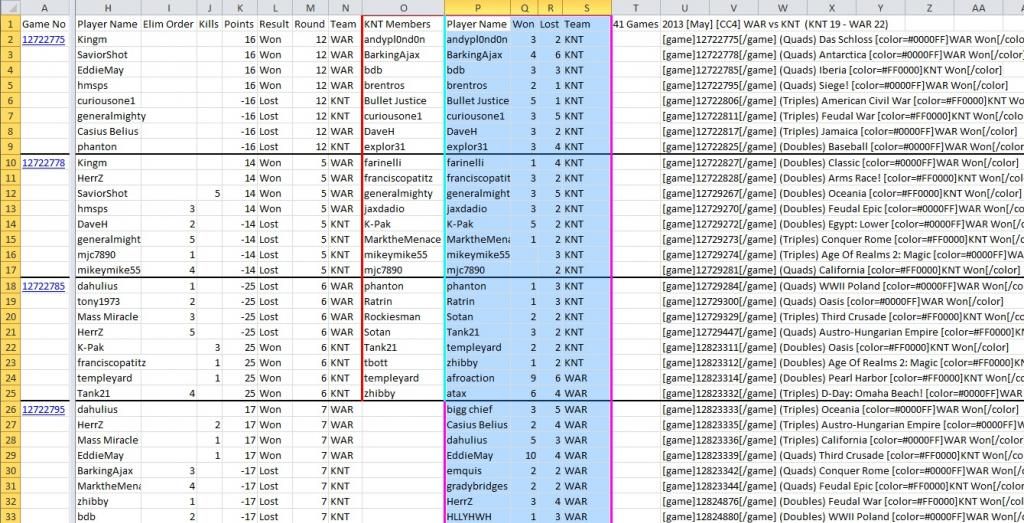
 and the second is the one that I'll explain below - as it is a little easier!


 _____________





 which links players to Number of wins and losses and any active games:
 which links game numbers to winning round and players;
 which brings player data pertaining to the labels that the TO adds when creating the games.


 and many thanks to agentcom for showing me the light


 )
)


 [/url]
 [/url]